
|
xtd
1.0.0
|
Loading...
Searching...
No Matches
xtd::forms::link_label Class Reference
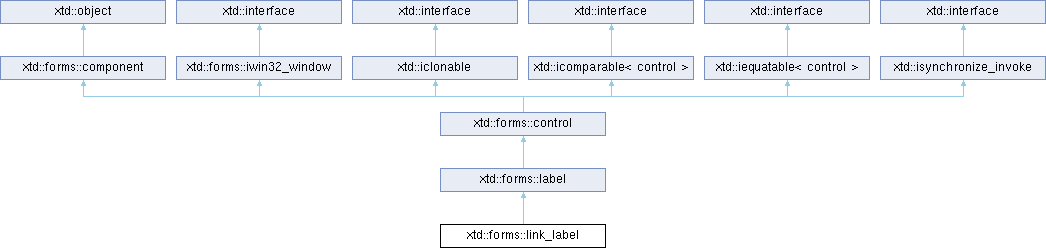
Inheritance diagram for xtd::forms::link_label:
Definition
Represents a Windows label control that can display hyperlinks.
- Header
- #include <xtd/forms/link_label>
- Namespace
- xtd::forms
- Library
- xtd.forms
- Remarks
- The xtd::forms::link_label control is similar to a xtd::forms::label control with the exception that it can display a hyperlink. Multiple hyperlinks can be specified in the text of the control. Each hyperlink can perform a different task within an application. For example, you can use a hyperlink to display a Web site in your web browser or to load a log file associated with an application.
- Each hyperlink displayed in the xtd::forms::link_label control is an instance of the xtd::forms::link_label::link class. The xtd::forms::link_label::link class defines display information, state, and location of the hyperlink. In addition, the xtd::forms::link_label::link::link_data property of the xtd::forms::link_label::link class enables you to associate information, such as a URL to display, with the hyperlink. When a user clicks a hyperlink within the control, the xtd::forms::link_label::link_clicked event is raised, and the xtd::forms::link_label::link object representing the hyperlink that was clicked is passed as part of the xtd::forms::link_label_link_clicked_event_args object that is passed as a parameter to the event handler. You can use this object to obtain the xtd::forms::link_label::link object associated with the hyperlink that was clicked by the user. All hyperlinks contained within the xtd::forms::link_label control are stored in the xtd::forms::link_label::link_collection class instance for the control.
- There are two ways to add a hyperlink to the the xtd::forms::link_label control. The quickest way is to specify a the xtd::forms::link_label::link_area and assign it to the the xtd::forms::link_label::link_area property. This enables you to specify a single hyperlink within the text of the control. To add multiple hyperlinks, you can use the the xtd::forms::link_label::link_collection::push_back method of the the xtd::forms::link_label::link_collection class by accessing the collection through the the xtd::forms::link_label::links property.
- When a xtd::forms::link_label control is created, a default hyperlink that contains all the text within the xtd::forms::link_label control is added to the xtd::forms::link_label::link_collection. You can override this default link by specifying a new link area with the xtd::forms::link_label::link_area property, or specify a link using the xtd::forms::link_label::link_collection::push_back method of the xtd::forms::link_label::link_collection. You can also remove the default hyperlink by using the xtd::forms::link_label::link_collection::erase method of the xtd::forms::link_label::link_collection class.
- The xtd::forms::link_label::tab_stop property is true by default, as long as there is at least one link of greater than zero length in the Links collection. The xtd::forms::link_label control has a single xtd::forms::link_label::tab_index value. However, each link of greater than zero length gets its own tab stop, in left-to-right order. To prevent tab navigation to the xtd::forms::link_label control, set the xtd::forms::link_label::tab_stop property to false. However, be aware that adding new links to the xtd::forms::link_label::links collection will automatically set the xtd::forms::link_label::tab_stop property to true again.
- The xtd::forms::link_label provides a number of properties that enable you to define the display appearance of hyperlinks in the control. The xtd::forms::link_label::active_link_color, xtd::forms::link_label::disabled_link_color, xtd::forms::link_label::link_color, and xtd::forms::link_label::visited_link_color properties define the colors used when displaying a hyperlink in various states. The xtd::forms::link_label::link_behavior property defines the display of the underline that is associated with a hyperlink.
- Appearance
Windows macOS Gnome Light 


Dark 


- Examples
- The following code example demonstrates the use of link_label control. #include <xtd/xtd>namespace link_label_example {public:form1() {text("Link label example");client_size({400, 200});link_label1.location({10, 10});link_label1.auto_size(true);link_label1.parent(*this);link_label1.text("xtd Reference Guide");link_label1.link_clicked += delegate_(object & sender, link_label_clicked_event_args & e) {e.visited(true);diagnostics::process::start(diagnostics::process_start_info {"https://gammasoft71.github.io/xtd/reference_guides/latest/index.html"}.use_shell_execute(true));};link_label2.location({10, 40});link_label2.auto_size(true);link_label2.parent(*this);link_label2.text("Gammasoft presents xtd framework");link_label2.links().add({0, 9, "https://gammasoft71.github.io"});link_label2.links().add({19, 3, "https://gammasoft71.github.io/xtd"});link_label2.link_clicked += delegate_(object & sender, link_label_clicked_event_args & e) {e.visited(true);diagnostics::process::start(diagnostics::process_start_info {as<string>(e.link().link_data())}.use_shell_execute(true));};link_label3.location({10, 70});link_label3.auto_size(true);link_label3.parent(*this);link_label3.text("Put your temporary files in the temp directory");link_label3.links().add({32, 4, io::path::get_temp_path()});link_label3.link_clicked += delegate_(object & sender, link_label_clicked_event_args & e) {diagnostics::process::start(diagnostics::process_start_info {as<string>(e.link().link_data())}.use_shell_execute(true));};}private:link_label link_label1;link_label link_label2;link_label link_label3;};}auto main() -> int {application::run(link_label_example::form1 {});}Specifies a set of values that are used when you start a process.Definition process_start_info.hpp:40bool use_shell_execute() const noexceptGets a value indicating whether to use the operating system shell to start the process.auto start() -> boolStarts (or reuses) the process resource that is specified by the xtd::diagnostics::process::start_inf...virtual auto text() const noexcept -> const xtd::string &Gets the text associated with this control.virtual auto client_size() const noexcept -> const xtd::drawing::size &Gets the height and width of the client area of the control.Represents a window or dialog box that makes up an application's user interface.Definition form.hpp:54#define delegate_The declaration of a delegate type is similar to a method signature. It has a return value and any nu...Definition delegate.hpp:1018xtd::forms::style_sheets::control link_labelThe link label data allows you to specify the box of a link label control.Definition link_label.hpp:25
Classes | |
| class | link_collection |
| Represents a collection of controls. More... | |
Public Aliases | |
| using | link |
| Represents a link within a link_label control. | |
Public Events | |
| xtd::event< link_label, xtd::forms::link_label_clicked_event_handler > | link_clicked |
| Occurs when a link is clicked within the control. | |
Public Constructors | |
| link_label () | |
| Initializes a new default instance of the xtd::forms::link_label class. | |
Public Properties | |
| auto | active_link_color () const noexcept -> xtd::drawing::color |
| Gets the color used to display an active link. | |
| auto | active_link_color (const xtd::drawing::color &value) -> link_label & |
| Sets the color used to display an active link. | |
| auto | disabled_link_color () const noexcept -> xtd::drawing::color |
| Gets the color used when displaying a disabled link. | |
| auto | disabled_link_color (const xtd::drawing::color &value) -> link_label & |
| Sets the color used when displaying a disabled link. | |
| auto | link_area () const noexcept -> xtd::forms::link_area |
| Gets the range in the text to treat as a link. | |
| auto | link_area (xtd::forms::link_area value) -> link_label & |
| Sets the range in the text to treat as a link. | |
| auto | link_behavior () const noexcept -> xtd::forms::link_behavior |
| Gets a value that represents the behavior of a link. | |
| auto | link_behavior (xtd::forms::link_behavior value) -> link_label & |
| Sets a value that represents the behavior of a link. | |
| auto | link_color () const noexcept -> xtd::drawing::color |
| Gets the color used when displaying a normal link. | |
| auto | link_color (const xtd::drawing::color &value) -> link_label & |
| Sets the color used when displaying a normal link. | |
| auto | links () const noexcept -> const link_collection & |
| Gets the collection of links contained within the xtd::forms::link_label. | |
| auto | links () -> link_collection & |
| Gets the collection of links contained within the xtd::forms::link_label. | |
| auto | links (const link_collection &value) -> link_label & |
| Sets the collection of links contained within the xtd::forms::link_label. | |
| auto | override_cursor () const noexcept -> xtd::forms::cursor |
| Gets the mouse pointer to use when the mouse pointer is within the bounds of the xtd::forms::link_label. | |
| auto | override_cursor (const xtd::forms::cursor &value) -> link_label & |
| Sets the mouse pointer to use when the mouse pointer is within the bounds of the xtd::forms::link_label. | |
| xtd::drawing::color | visited_link_color () const noexcept |
| Gets the color used when displaying a link that has been previously visited. | |
| auto | visited_link_color (const xtd::drawing::color &value) -> link_label & |
| Sets the color used when displaying a link that has been previously visited. | |
Public Static Methods | |
| static auto | create () -> link_label |
| A factory to create an xtd::forms::link_label. | |
| static auto | create (const xtd::drawing::point &location) -> link_label |
| A factory to create an xtd::forms::link_label with specified location. | |
| static auto | create (const xtd::drawing::point &location, const xtd::drawing::size &size) -> link_label |
| A factory to create an xtd::forms::link_label with specified location, and size. | |
| static auto | create (const xtd::drawing::point &location, const xtd::drawing::size &size, const xtd::string &name) -> link_label |
| A factory to create an xtd::forms::link_label with specified location, size, and name. | |
| static auto | create (const xtd::string &text) -> link_label |
| A factory to create an xtd::forms::link_label with specified text. | |
| static auto | create (const xtd::string &text, const xtd::drawing::point &location) -> link_label |
| A factory to create an xtd::forms::link_label with specified text, and location. | |
| static auto | create (const xtd::string &text, const xtd::drawing::point &location, const xtd::drawing::size &size) -> link_label |
| A factory to create an xtd::forms::link_label with specified text, location, and size. | |
| static auto | create (const xtd::string &text, const xtd::drawing::point &location, const xtd::drawing::size &size, const xtd::string &name) -> link_label |
| A factory to create an xtd::forms::link_label with specified text, location, size, and name. | |
| static auto | create (const xtd::string &text, const link_collection &links) -> link_label |
| A factory to create an xtd::forms::link_label with specified text. | |
| static auto | create (const xtd::string &text, const link_collection &links, const xtd::drawing::point &location) -> link_label |
| A factory to create an xtd::forms::link_label with specified text, and location. | |
| static auto | create (const xtd::string &text, const link_collection &links, const xtd::drawing::point &location, const xtd::drawing::size &size) -> link_label |
| A factory to create an xtd::forms::link_label with specified text, location, and size. | |
| static auto | create (const xtd::string &text, const link_collection &links, const xtd::drawing::point &location, const xtd::drawing::size &size, const xtd::string &name) -> link_label |
| A factory to create an xtd::forms::link_label with specified text, location, size, and name. | |
| static auto | create (const xtd::forms::control &parent) -> link_label |
| A factory to create an xtd::forms::link_label with specified parent,. | |
| static auto | create (const xtd::forms::control &parent, const xtd::drawing::point &location) -> link_label |
| A factory to create an xtd::forms::link_label with specified parent, location. | |
| static auto | create (const xtd::forms::control &parent, const xtd::drawing::point &location, const xtd::drawing::size &size) -> link_label |
| A factory to create an xtd::forms::link_label with specified parent, location, and size. | |
| static auto | create (const xtd::forms::control &parent, const xtd::drawing::point &location, const xtd::drawing::size &size, const xtd::string &name) -> link_label |
| A factory to create an xtd::forms::link_label with specified parent, location, size, and name. | |
| static auto | create (const xtd::forms::control &parent, const xtd::string &text) -> link_label |
| A factory to create an xtd::forms::link_label with specified parent, and text. | |
| static auto | create (const xtd::forms::control &parent, const xtd::string &text, const xtd::drawing::point &location) -> link_label |
| A factory to create an xtd::forms::link_label with specified parent, text, and location. | |
| static auto | create (const xtd::forms::control &parent, const xtd::string &text, const xtd::drawing::point &location, const xtd::drawing::size &size) -> link_label |
| A factory to create an xtd::forms::link_label with specified parent, text, location, and size. | |
| static auto | create (const xtd::forms::control &parent, const xtd::string &text, const xtd::drawing::point &location, const xtd::drawing::size &size, const xtd::string &name) -> link_label |
| A factory to create an xtd::forms::link_label with specified parent, text, location, size, and name. | |
| static auto | create (const xtd::forms::control &parent, const xtd::string &text, const link_collection &links) -> link_label |
| A factory to create an xtd::forms::link_label with specified parent, and text. | |
| static auto | create (const xtd::forms::control &parent, const xtd::string &text, const link_collection &links, const xtd::drawing::point &location) -> link_label |
| A factory to create an xtd::forms::link_label with specified parent, text, and location. | |
| static auto | create (const xtd::forms::control &parent, const xtd::string &text, const link_collection &links, const xtd::drawing::point &location, const xtd::drawing::size &size) -> link_label |
| A factory to create an xtd::forms::link_label with specified parent, text, location, and size. | |
| static auto | create (const xtd::forms::control &parent, const xtd::string &text, const link_collection &links, const xtd::drawing::point &location, const xtd::drawing::size &size, const xtd::string &name) -> link_label |
| A factory to create an xtd::forms::link_label with specified parent, text, location, size, and name. | |
Additional Inherited Members | |
| using | context_menu_ref |
| Represent an xtd::forms::context_menu reference. | |
| xtd::event< label, xtd::event_handler > | image_changed |
| Occurs when the value of the image property changes. | |
| xtd::event< label, xtd::event_handler > | text_align_changed |
| Occurs when the value of the xtd::forms::label::text_align property has changed. | |
| xtd::event< control, xtd::event_handler > | auto_size_changed |
| Occurs when the value of the xtd::forms::control::auto_size property changes. | |
| xtd::event< control, xtd::event_handler > | back_color_changed |
| Occurs when the value of the xtd::forms::control::back_color property changes. | |
| xtd::event< control, xtd::event_handler > | background_image_changed |
| Occurs when the value of the xtd::forms::control::background_image property changes. | |
| xtd::event< control, xtd::event_handler > | background_image_layout_changed |
| Occurs when the value of the xtd::forms::control::background_image_layout property changes. | |
| xtd::event< control, xtd::event_handler > | control_appearance_changed |
| Occurs when the value of the xtd::forms::control::control_appearance property changes. | |
| xtd::event< control, xtd::event_handler > | click |
| Occurs when the xtd::forms::control is clicked. | |
| xtd::event< control, xtd::event_handler > | client_size_changed |
| Occurs when the value of the xtd::forms::control::client_size property changes. | |
| xtd::event< control, xtd::event_handler > | cursor_changed |
| Occurs when the value of the xtd::forms::control::cursor property changes. | |
| xtd::event< control, xtd::forms::control_event_handler > | control_added |
| Occurs when a new xtd::forms::control::control is added to the xtd::forms::control::control_collection. | |
| xtd::event< control, xtd::forms::control_event_handler > | control_removed |
| Occurs when a new xtd::forms::control:: is removed to the xtd::forms::control::control_collection. | |
| xtd::event< control, xtd::event_handler > | dock_changed |
| Occurs when the value of the xtd::forms::control::dock property changes. | |
| xtd::event< control, xtd::event_handler > | double_click |
| Occurs when the xtd::forms::control is double-clicked. | |
| xtd::event< control, xtd::event_handler > | got_focus |
| Occurs when the xtd::forms::control receives focus. | |
| xtd::event< control, xtd::event_handler > | handle_created |
| Occurs when a handle is created for the xtd::forms::control. | |
| xtd::event< control, xtd::event_handler > | handle_destroyed |
| Occurs when the control's handle is in the process of being destroyed. | |
| xtd::event< control, xtd::event_handler > | enabled_changed |
| Occurs when the value of the xtd::forms::control::enabled property changes. | |
| xtd::event< control, xtd::event_handler > | fore_color_changed |
| Occurs when the value of the xtd::forms::control::fore_color property changes. | |
| xtd::event< control, xtd::event_handler > | font_changed |
| Occurs when the value of the xtd::forms::control::font property changes. | |
| xtd::event< control, xtd::forms::help_event_handler > | help_requested |
| Occurs when the user requests help for a xtd::forms::control. | |
| xtd::event< control, xtd::forms::key_event_handler > | key_down |
| Occurs when a key is pressed while the xtd::forms::control has focus. | |
| xtd::event< control, xtd::forms::key_press_event_handler > | key_press |
| Occurs when a character. space or backspace key is pressed while the xtd::forms::control has focus. | |
| xtd::event< control, xtd::forms::key_event_handler > | key_up |
| Occurs when a key is released while the xtd::forms::control has focus. | |
| xtd::event< control, xtd::event_handler > | layout |
| Occurs when a xtd::forms::control should reposition its child controls. | |
| xtd::event< control, xtd::event_handler > | location_changed |
| Occurs when the value of the xtd::forms::control::location property changes. | |
| xtd::event< control, xtd::event_handler > | lost_focus |
| Occurs when the xtd::forms::control loses focus. | |
| xtd::event< control, xtd::forms::mouse_event_handler > | mouse_click |
| Occurs when the xtd::forms::control is clicked by the mouse. | |
| xtd::event< control, xtd::forms::mouse_event_handler > | mouse_double_click |
| Occurs when the xtd::forms::control is double clicked by the mouse. | |
| xtd::event< control, xtd::forms::mouse_event_handler > | mouse_down |
| Occurs when the mouse pointer is over the xtd::forms::control and a mouse button is pressed. | |
| xtd::event< control, xtd::event_handler > | mouse_enter |
| Occurs when the mouse pointer enters the xtd::forms::control. | |
| xtd::event< control, xtd::forms::mouse_event_handler > | mouse_horizontal_wheel |
| Occurs when the mouse horizontal wheel moves while the xtd::forms::control has focus. | |
| xtd::event< control, xtd::event_handler > | mouse_leave |
| Occurs when the mouse pointer leaves the xtd::forms::control. | |
| xtd::event< control, xtd::forms::mouse_event_handler > | mouse_move |
| Occurs when the mouse pointer is moved over the xtd::forms::control. | |
| xtd::event< control, xtd::forms::mouse_event_handler > | mouse_up |
| Occurs when the mouse pointer is over the xtd::forms::control and a mouse button is released. | |
| xtd::event< control, xtd::forms::mouse_event_handler > | mouse_wheel |
| Occurs when the mouse wheel moves while the xtd::forms::control has focus. | |
| xtd::event< control, xtd::event_handler > | move |
| Occurs when the control is moved. | |
| xtd::event< control, xtd::forms::paint_event_handler > | paint |
| Occurs when the xtd::forms::control is redrawn. | |
| xtd::event< control, xtd::event_handler > | parent_changed |
| Occurs when the value of the xtd::forms::control::parent property changes. | |
| xtd::event< control, xtd::event_handler > | region_changed |
| Occurs when the value of the xtd::forms::control::region property changes. | |
| xtd::event< control, xtd::event_handler > | resize |
| Occurs when the xtd::forms::control is resized. | |
| xtd::event< control, xtd::event_handler > | right_to_left_changed |
| Occurs when the value of the xtd::forms::control::right_to_left property changes. | |
| xtd::event< control, xtd::event_handler > | size_changed |
| Occurs when the value of the xtd::forms::control::size property changes. | |
| xtd::event< control, xtd::event_handler > | style_sheet_changed |
| Occurs when the value of the xtd::forms::control::style_sheet property changes or when xtd::application::style_sheet property changes. | |
| xtd::event< control, xtd::event_handler > | system_colors_changed |
| Occurs when the xtd::drwing::system_colors changes. | |
| xtd::event< control, xtd::event_handler > | tab_stop_changed |
| Occurs when the xtd::forms::control::tab_stop property value changes. | |
| xtd::event< control, xtd::event_handler > | text_changed |
| Occurs when the value of the xtd::forms::control::text property changes. | |
| xtd::event< control, xtd::event_handler > | visible_changed |
| Occurs when the value of the xtd::forms::control::visible property changes. | |
| label () | |
| Initialize a new instance of label class. | |
| virtual auto | auto_ellipsis () const noexcept -> bool |
| Gets a value indicating whether the ellipsis character (...) appears at the right edge of the xtd::forms::label, denoting that the xtd::forms::label text extends beyond the specified length of the xtd::forms::label. | |
| virtual auto | auto_ellipsis (bool value) -> label & |
| Sets a value indicating whether the ellipsis character (...) appears at the right edge of the xtd::forms::label, denoting that the xtd::forms::label text extends beyond the specified length of the xtd::forms::label. | |
| virtual auto | border_sides () const noexcept -> xtd::forms::border_sides |
| Gets the border sides for the control. | |
| virtual auto | border_sides (xtd::forms::border_sides value) -> label & |
| Sets the border sides for the control. | |
| virtual auto | border_style () const noexcept -> xtd::forms::border_style |
| Gets the border style for the control. | |
| virtual auto | border_style (xtd::forms::border_style value) -> label & |
| Sets the border style for the control. | |
| virtual auto | border_style (xtd::null_ptr) -> label & |
| Resets the border style for the control. | |
| auto | control_appearance (xtd::forms::control_appearance value) -> xtd::forms::control &override |
| Sets control appearance. | |
| virtual auto | flat_style () const noexcept -> xtd::forms::flat_style |
| Gets the flat style appearance of the label control. | |
| virtual auto | flat_style (xtd::forms::flat_style value) -> label & |
| Sets the flat style appearance of the label control. | |
| virtual auto | image () const noexcept -> const xtd::drawing::image & |
| Gets the image that is displayed on a label control. | |
| virtual auto | image (const xtd::drawing::image &value) -> label & |
| Sets the image that is displayed on a label control. | |
| virtual auto | image_align () const noexcept -> xtd::forms::content_alignment |
| Gets the alignment of the image on the label control. | |
| virtual auto | image_align (xtd::forms::content_alignment value) -> label & |
| Gets the alignment of the image on the label control. | |
| virtual auto | image_index () const noexcept -> xtd::int32 |
| Gets the image list index value of the image displayed on the label control. | |
| virtual auto | image_index (xtd::int32 value) -> label & |
| Sets the image list index value of the image displayed on the label control. | |
| virtual auto | image_list () const noexcept -> const xtd::forms::image_list & |
| Gets the image_list that contains the image displayed on a label control. | |
| virtual auto | image_list () noexcept -> xtd::forms::image_list & |
| Gets the image_list that contains the image displayed on a label control. | |
| virtual auto | image_list (const xtd::forms::image_list &value) -> label & |
| Sets the image_list that contains the image displayed on a label control. | |
| virtual auto | shadow () const noexcept -> bool |
| Gets a value that allows to draw a drop shadow under the text. | |
| virtual auto | shadow (bool value) -> label & |
| Sets a value that allows to draw a drop shadow under the text. | |
| virtual auto | shadows () const noexcept -> const xtd::forms::shadows & |
| Gets an xtd::forms::shadow array used to draw shadows under the text. | |
| virtual auto | shadows (const xtd::forms::shadows &value) -> label & |
| Sets an xtd::forms::shadow array used to draw shadows under the text. | |
| virtual auto | text_align () const noexcept -> xtd::forms::content_alignment |
| Gets the alignment of the text on the label control. | |
| virtual auto | text_align (xtd::forms::content_alignment value) -> label & |
| Gets the alignment of the text on the label control. | |
| virtual auto | control_appearance () const noexcept -> xtd::forms::control_appearance |
| Gets control appearance. | |
| control () | |
| Initializes a new instance of the xtd::forms::control class with default settings. | |
| control (const xtd::string &text) | |
| Initializes a new instance of the xtd::forms::control class with specific text. | |
| control (const control &parent, const xtd::string &text) | |
| Initializes a new instance of the xtd::forms::control class as a child control, with specific text. | |
| control (const xtd::string &text, int32 left, int32 top, int32 width, int32 height) | |
| Initializes a new instance of the control class with specific text, size, and location. | |
| control (const control &parent, const xtd::string &text, int32 left, int32 top, int32 width, int32 height) | |
| Initializes a new instance of the xtd::forms::control class as a child control, with specific text, size, and location. | |
| virtual auto | anchor () const noexcept -> xtd::forms::anchor_styles |
| Gets the edges of the container to which a control is bound and determines how a control is resized with its parent. | |
| virtual auto | anchor (xtd::forms::anchor_styles value) -> control & |
| Gets the edges of the container to which a control is bound and determines how a control is resized with its parent. | |
| virtual auto | auto_scroll_point () const noexcept -> xtd::drawing::point |
| Gets where this control is scrolled to in scroll_control_into_view(control). | |
| virtual auto | auto_size () const noexcept -> bool |
| Gets a value that indicates whether the control resizes based on its contents. | |
| virtual auto | auto_size (bool value) -> control & |
| Sets a value that indicates whether the control resizes based on its contents. | |
| virtual auto | back_color () const noexcept -> xtd::drawing::color |
| Gets the background color for the control. | |
| virtual auto | back_color (const xtd::drawing::color &value) -> control & |
| Sets the background color for the control. | |
| virtual auto | back_color (xtd::null_ptr) -> control & |
| Resets the background color for the control. | |
| virtual auto | background_image () const noexcept -> const xtd::drawing::image & |
| Gets the background image displayed in the control. | |
| virtual auto | background_image (const xtd::drawing::image &value) -> control & |
| Sets the background image displayed in the control. | |
| virtual auto | background_image_layout () const noexcept -> xtd::forms::image_layout |
| Gets the background image layout as defined in the xtd::forms::image_layout enumeration. | |
| virtual auto | background_image_layout (xtd::forms::image_layout value) -> control & |
| Sets the background image layout as defined in the xtd::forms::image_layout enumeration. | |
| virtual auto | bottom () const noexcept -> xtd::int32 |
| Gets the distance, in pixels, between the bottom edge of the control and the top edge of its container's client area. | |
| virtual auto | bounds () const noexcept -> xtd::drawing::rectangle |
| Gets the size and location of the control including its nonclient elements, in pixels, relative to the parent control. | |
| virtual auto | bounds (const xtd::drawing::rectangle &value) -> control & |
| Sets the size and location of the control including its nonclient elements, in pixels, relative to the parent control. | |
| virtual auto | can_focus () const noexcept -> bool |
| Gets a value indicating whether the control can receive focus. | |
| virtual auto | can_select () const noexcept -> bool |
| Gets a value indicating whether the control can be selected. | |
| auto | can_raise_events () const noexcept -> bool override |
| Determines if events can be raised on the control. | |
| virtual auto | client_rectangle () const noexcept -> const xtd::drawing::rectangle & |
| Gets the rectangle that represents the client area of the control. | |
| virtual auto | client_size () const noexcept -> const xtd::drawing::size & |
| Gets the height and width of the client area of the control. | |
| virtual auto | client_size (const xtd::drawing::size &value) -> control & |
| Sets the height and width of the client area of the control. | |
| virtual auto | company_name () const noexcept -> xtd::string |
| Gets the name of the company or creator of the application containing the control. | |
| virtual auto | context_menu () const noexcept -> std::optional< context_menu_ref > |
| Gets the xtd::forms::context_menu that is displayed in the control. | |
| virtual auto | context_menu (xtd::forms::context_menu &value) -> control & |
| Sets the xtd::forms::context_menu that is displayed in the control. | |
| virtual auto | context_menu (xtd::null_ptr) -> control & |
| Resets the xtd::forms::context_menu that is displayed in the control. | |
| virtual auto | controls () noexcept -> control_collection & |
| Gets the collection of controls contained within the control. | |
| virtual auto | controls () const noexcept -> const control_collection & |
| Gets the collection of controls contained within the control. | |
| virtual auto | created () const noexcept -> bool |
| Gets a value indicating whether the control has been created. | |
| virtual auto | cursor () const noexcept -> xtd::forms::cursor |
| Gets the cursor that is displayed when the mouse pointer is over the control. | |
| virtual auto | cursor (const xtd::forms::cursor &value) -> control & |
| Sets the cursor that is displayed when the mouse pointer is over the control. | |
| virtual auto | cursor (xtd::null_ptr) -> control & |
| Resets the cursor that is displayed when the mouse pointer is over the control. | |
| virtual auto | display_rectangle () const noexcept -> xtd::drawing::rectangle |
| Gets the rectangle that represents the display area of the control. | |
| virtual auto | dock () const noexcept -> xtd::forms::dock_style |
| Gets which control borders are docked to its parent control and determines how a control is resized with its parent. | |
| virtual auto | dock (xtd::forms::dock_style value) -> control & |
| Sets which control borders are docked to its parent control and determines how a control is resized with its parent. | |
| virtual auto | double_buffered () const noexcept -> bool |
| Gets a value indicating whether this control should redraw its surface using a secondary buffer to reduce or prevent flicker. | |
| virtual auto | double_buffered (bool value) -> control & |
| Sets a value indicating whether this control should redraw its surface using a secondary buffer to reduce or prevent flicker. | |
| virtual auto | enabled () const noexcept -> bool |
| Gets a value indicating whether the control can respond to user interaction. | |
| virtual auto | enabled (bool value) -> control & |
| Sets a value indicating whether the control can respond to user interaction. | |
| virtual auto | focused () const noexcept -> bool |
| Gets a value indicating whether the control has input focus. | |
| virtual auto | font () const noexcept -> xtd::drawing::font |
| Gets the font of the text displayed by the control. | |
| virtual auto | font (const xtd::drawing::font &value) -> control & |
| Sets the font of the text displayed by the control. | |
| virtual auto | font (xtd::null_ptr) -> control & |
| Resets the font of the text displayed by the control. | |
| virtual auto | fore_color () const noexcept -> xtd::drawing::color |
| Gets the foreground color of the control. | |
| virtual auto | fore_color (const xtd::drawing::color &value) -> control & |
| Sets the foreground color of the control. | |
| virtual auto | fore_color (xtd::null_ptr) -> control & |
| Resets the foreground color of the control. | |
| auto | handle () const -> xtd::intptr override |
| Gets the window handle that the control is bound to. | |
| virtual auto | height () const noexcept -> xtd::int32 |
| Gets the height of the control. | |
| virtual auto | height (xtd::int32 value) -> control & |
| Sets the height of the control. | |
| auto | invoke_required () const noexcept -> bool override |
| Gets a value indicating whether the caller must call an invoke method when making method calls to the control because the caller is on a different thread than the one the control was created on. | |
| auto | is_handle_created () const noexcept -> bool |
| Gets a value indicating whether the control has a handle associated with it. | |
| virtual auto | left () const noexcept -> xtd::int32 |
| Gets the distance, in pixels, between the left edge of the control and the left edge of its container's client area. | |
| virtual auto | left (xtd::int32 value) -> control & |
| Sets the distance, in pixels, between the left edge of the control and the left edge of its container's client area. | |
| virtual auto | location () const noexcept -> xtd::drawing::point |
| Gets the coordinates of the upper-left corner of the control relative to the upper-left corner of its container. | |
| virtual auto | location (const xtd::drawing::point &value) -> control & |
| Sets the coordinates of the upper-left corner of the control relative to the upper-left corner of its container. | |
| virtual auto | margin () const noexcept -> xtd::forms::padding |
| Gets the space between controls. | |
| virtual auto | margin (const xtd::forms::padding &value) -> control & |
| Sets the space between controls. | |
| virtual auto | maximum_client_size () const noexcept -> const xtd::drawing::size & |
| Gets the client size that is the upper limit that xtd::forms::control::get_preferred_size can specify. | |
| virtual auto | maximum_client_size (const xtd::drawing::size &size) -> control & |
| Sets the client size that is the upper limit that xtd::forms::control::get_preferred_size can specify. | |
| virtual auto | maximum_size () const noexcept -> const xtd::drawing::size & |
| Gets the size that is the upper limit that xtd::forms::control::get_preferred_size can specify. | |
| virtual auto | maximum_size (const xtd::drawing::size &value) -> control & |
| Sets the size that is the upper limit that xtd::forms::control::get_preferred_size can specify. | |
| virtual auto | minimum_client_size () const noexcept -> const xtd::drawing::size & |
| Gets the client size that is the lower limit that xtd::forms::control::get_preferred_size can specify. | |
| virtual auto | minimum_client_size (const xtd::drawing::size &value) -> control & |
| Sets the client size that is the lower limit that xtd::forms::control::get_preferred_size can specify. | |
| virtual auto | minimum_size () const noexcept -> const xtd::drawing::size & |
| Gets the size that is the lower limit that xtd::forms::control::get_preferred_size can specify. | |
| virtual auto | minimum_size (const xtd::drawing::size &value) -> control & |
| Sets the size that is the lower limit that xtd::forms::control::get_preferred_size can specify. | |
| auto | native_handle () const noexcept -> xtd::intptr |
| Gets the native handle that the control is bound to. | |
| virtual auto | name () const noexcept -> const xtd::string & |
| Gets the name of the control. | |
| virtual auto | name (const xtd::string &value) -> control & |
| Sets the name of the control. | |
| virtual auto | padding () const noexcept -> xtd::forms::padding |
| Gets padding within the control. | |
| virtual auto | padding (const xtd::forms::padding &value) -> control & |
| Sets padding within the control. | |
| virtual auto | parent () const noexcept -> std::optional< xtd::forms::control_ref > |
| Gets the parent container of the control. | |
| virtual auto | parent (const control &value) -> control & |
| Sets the parent container of the control. | |
| virtual auto | parent (xtd::null_ptr) -> control & |
| Resets the parent container of the control. | |
| virtual auto | product_name () const noexcept -> xtd::string |
| Gets the product name of the assembly containing the control. | |
| auto | recreating_handle () const noexcept -> bool |
| Gets a value indicating whether the control is currently re-creating its handle. | |
| virtual auto | region () const noexcept -> const xtd::drawing::region & |
| Gets the window region associated with the control. | |
| virtual auto | region (const xtd::drawing::region &value) -> control & |
| Sets the window region associated with the control. | |
| virtual auto | right () const noexcept -> xtd::int32 |
| Gets the distance, in pixels, between the right edge of the control and the left edge of its container's client area. | |
| virtual auto | right_to_left () const noexcept -> xtd::forms::right_to_left |
| Gets a value indicating whether control's elements are aligned to support locales using right-to-left fonts. | |
| virtual auto | right_to_left (xtd::forms::right_to_left value) -> control & |
| Sets a value indicating whether control's elements are aligned to support locales using right-to-left fonts. | |
| virtual auto | right_to_left (xtd::null_ptr) -> control & |
| Resets a value indicating whether control's elements are aligned to support locales using right-to-left fonts. | |
| virtual auto | size () const noexcept -> xtd::drawing::size |
| Gets the height and width of the control. | |
| virtual auto | size (const xtd::drawing::size &value) -> control & |
| Sets the height and width of the control. | |
| virtual auto | style_sheet () const noexcept -> xtd::forms::style_sheets::style_sheet |
| Gets the contol style sheet. | |
| virtual auto | style_sheet (const xtd::forms::style_sheets::style_sheet &value) -> control & |
| Sets the contol style sheet. | |
| virtual auto | style_sheet (const xtd::string &value) -> control & |
| Sets the contol style sheet. | |
| virtual auto | style_sheet (xtd::null_ptr) -> control & |
| Resets the contol style sheet. | |
| virtual auto | tab_stop () const noexcept -> bool |
| Gets a value indicating whether the user can give the focus to this control using the TAB key. | |
| virtual auto | tab_stop (bool value) -> control & |
| Sets a value indicating whether the user can give the focus to this control using the TAB key. | |
| virtual auto | tag () const noexcept -> const xtd::any_object & |
| Gets the object that contains data about the control. | |
| virtual auto | tag (const xtd::any_object &value) -> control & |
| Sets the object that contains data about the control. | |
| virtual auto | text () const noexcept -> const xtd::string & |
| Gets the text associated with this control. | |
| virtual auto | text (const xtd::string &value) -> control & |
| Sets the text associated with this control. | |
| auto | toolkit_handle () const noexcept -> xtd::intptr |
| Gets the toolkit handle that the control is bound to. | |
| virtual auto | top () const noexcept -> xtd::int32 |
| Gets the distance, in pixels, between the top edge of the control and the top edge of its container's client area. | |
| virtual auto | top (xtd::int32 value) -> control & |
| Sets the distance, in pixels, between the top edge of the control and the top edge of its container's client area. | |
| virtual auto | top_level_control () const noexcept -> std::optional< xtd::forms::control_ref > |
| Gets the parent control that is not parented by another Windows Forms control. Typically, this is the outermost Form that the control is contained in. | |
| virtual auto | visible () const noexcept -> bool |
| Gets a value indicating whether the control and all its child controls are displayed. | |
| virtual auto | visible (bool value) -> control & |
| Sets a value indicating whether the control and all its child controls are displayed. | |
| virtual auto | width () const noexcept -> xtd::int32 |
| Gets the width of the control. | |
| virtual auto | width (xtd::int32 value) -> control & |
| Sets the width of the control. | |
| auto | begin_invoke (xtd::delegate< void()> method) -> xtd::async_result override |
| Executes the specified delegate asynchronously on the thread that the control's underlying handle was created on. | |
| auto | begin_invoke (xtd::delegate< void(xtd::array< xtd::any_object >)> method, const xtd::array< xtd::any_object > &args) -> xtd::async_result override |
| Executes the specified delegate asynchronously with the specified arguments, on the thread that the control's underlying handle was created on. | |
| virtual auto | bring_to_front () -> void |
| Brings the control to the front of the z-order. | |
| auto | compare_to (const control &value) const noexcept -> xtd::int32 override |
| auto | create_control () -> void |
| Forces the creation of the visible control, including the creation of the handle and any visible child controls. | |
| auto | create_graphics () const -> xtd::drawing::graphics |
| Creates the xtd::drawing::graphics for the control. | |
| virtual auto | destroy_control () -> void |
| Forces the destruction of the visible control, including the destruction of the handle and any visible child controls. | |
| auto | end_invoke (xtd::async_result async) -> std::optional< xtd::object_ref > override |
| Retrieves the return value of the asynchronous operation represented by the async_result_invoke passed. | |
| auto | equals (const xtd::object &obj) const noexcept -> bool override |
| Determines whether the specified object is equal to the current object. | |
| auto | equals (const control &value) const noexcept -> bool override |
| Determines whether the specified object is equal to the current object. | |
| auto | focus () -> bool |
| Sets input focus to the control. | |
| auto | get_auto_size_mode () const -> xtd::forms::auto_size_mode |
| Gets a value indicating how a control will behave when its auto_size property is enabled. | |
| auto | get_child_index (xtd::intptr child) const -> xtd::usize |
| Retrieves the index of a control within the control collection. | |
| auto | get_child_index (xtd::intptr child, bool &throw_exception) const -> xtd::usize |
| Retrieves the index of the specified child control within the control collection, and optionally raises an exception if the specified control is not within the control collection. | |
| auto | get_hash_code () const noexcept -> xtd::usize override |
| Serves as a hash function for a particular type. | |
| virtual auto | hide () -> void |
| Conceals the control from the user. | |
| virtual auto | invalidate () const -> void |
| Invalidates the entire surface of the control and causes the control to be redrawn. | |
| virtual auto | invalidate (bool invalidate_children) const -> void |
| Invalidates a specific region of the control and causes a paint message to be sent to the control. Optionally, invalidates the child controls assigned to the control. | |
| virtual auto | invalidate (const xtd::drawing::rectangle &rect) const -> void |
| Invalidates the specified region of the control (adds it to the control's update region, which is the area that will be repainted at the next paint operation), and causes a paint message to be sent to the control. | |
| virtual auto | invalidate (const xtd::drawing::rectangle &rect, bool invalidate_children) const -> void |
| Invalidates the specified region of the control (adds it to the control's update region, which is the area that will be repainted at the next paint operation), and causes a paint message to be sent to the control. Optionally, invalidates the child controls assigned to the control. | |
| virtual auto | invalidate (const xtd::drawing::region ®ion) const -> void |
| Invalidates the specified region of the control (adds it to the control's update region, which is the area that will be repainted at the next paint operation), and causes a paint message to be sent to the control. | |
| virtual auto | invalidate (const xtd::drawing::region ®ion, bool invalidate_children) const -> void |
| Invalidates the specified region of the control (adds it to the control's update region, which is the area that will be repainted at the next paint operation), and causes a paint message to be sent to the control. Optionally, invalidates the child controls assigned to the control. | |
| auto | invoke (xtd::delegate< void()> method) -> std::optional< xtd::object_ref > override |
| Executes the specified delegate on the thread that owns the control's underlying window handle. | |
| auto | invoke (xtd::delegate< void(xtd::array< xtd::any_object >)> method, const xtd::array< xtd::any_object > &args) -> std::optional< xtd::object_ref > override |
| Executes the specified delegate, on the thread that owns the control's underlying window handle, with the specified list of arguments. | |
| auto | invoke (xtd::delegate< void(xtd::array< xtd::any_object >)> method, const xtd::any_object &arg) -> std::optional< xtd::object_ref > override |
| Executes the specified delegate, on the thread that owns the control's underlying window handle, with the specified list of arguments. | |
| auto | perform_layout () -> void |
| Forces the control to apply layout logic to all its child controls. | |
| auto | point_to_client (const xtd::drawing::point &p) const -> xtd::drawing::point |
| Computes the location of the specified screen point into client coordinates. | |
| auto | point_to_screen (const xtd::drawing::point &p) const -> xtd::drawing::point |
| Computes the location of the specified client point into screen coordinates. | |
| auto | post_message (xtd::intptr hwnd, xtd::int32 msg, xtd::intptr wparam, xtd::intptr lparam) const -> bool |
| Places (posts) a message in the message queue with specified hwnd, message, wparam and lparam. | |
| virtual auto | pre_process_message (const xtd::forms::message &message) -> bool |
| Preprocesses keyboard or input messages within the message loop before they are dispatched. | |
| virtual auto | refresh () const -> void |
| Forces the control to invalidate its client area and immediately redraw itself and any child controls. | |
| auto | resume_layout () -> void |
| Resumes usual layout logic. | |
| auto | resume_layout (bool perform_layout) -> void |
| Resumes usual layout logic, optionally forcing an immediate layout of pending layout requests. | |
| auto | send_message (xtd::intptr hwnd, xtd::int32 msg, xtd::intptr wparam, xtd::intptr lparam) const -> xtd::intptr |
| Send a message with specified hwnd, message, wparam and lparam. | |
| auto | set_auto_size_mode (xtd::forms::auto_size_mode auto_size_modeauto_size_mode) -> void |
| Sets a value indicating how a control will behave when its auto_size property is enabled. | |
| auto | set_bounds (xtd::int32 x, xtd::int32 y, xtd::int32 width, xtd::int32 height) -> void |
| Sets the bounds of the control to the specified location and size. | |
| auto | set_bounds (xtd::int32 x, xtd::int32 y, xtd::int32 width, xtd::int32 height, xtd::forms::bounds_specified specified) -> void |
| Sets the specified bounds of the control to the specified location and size. | |
| virtual auto | show () -> void |
| Displays the control to the user. | |
| auto | suspend_layout () -> void |
| Temporarily suspends the layout logic for the control. | |
| auto | to_string () const noexcept -> xtd::string override |
| Returns a string containing the name of the control, if any. | |
| virtual auto | update () const -> void |
| Causes the control to redraw the invalidated regions within its client area. | |
| auto | operator<< (control &child) -> control & |
| Add child control. | |
| auto | operator>> (control &child) -> control & |
| Remove child control. | |
| object ()=default | |
| Create a new instance of the ultimate base class object. | |
| virtual auto | get_type () const noexcept -> type_object |
| Gets the type of the current instance. | |
| template<typename object_t> | |
| auto | memberwise_clone () const -> xtd::unique_ptr_object< object_t > |
| Creates a shallow copy of the current object. | |
| virtual auto | compare_to (const control &obj) const noexcept -> xtd::int32=0 |
| Compares the current instance with another object of the same type. | |
| virtual auto | equals (const control &) const noexcept -> bool=0 |
| Indicates whether the current object is equal to another object of the same type. | |
| static auto | create () -> label |
| A factory to create an xtd::forms::label. | |
| static auto | create (const xtd::drawing::point &location) -> label |
| A factory to create an xtd::forms::label with specified location. | |
| static auto | create (const xtd::drawing::point &location, const xtd::drawing::size &size) -> label |
| A factory to create an xtd::forms::label with specified location, and size. | |
| static auto | create (const xtd::drawing::point &location, const xtd::drawing::size &size, const xtd::string &name) -> label |
| A factory to create an xtd::forms::label with specified location, size, and name. | |
| static auto | create (const xtd::string &text) -> label |
| A factory to create an xtd::forms::label with specified text. | |
| static auto | create (const xtd::string &text, const xtd::drawing::point &location) -> label |
| A factory to create an xtd::forms::label with specified text, and location. | |
| static auto | create (const xtd::string &text, const xtd::drawing::point &location, const xtd::drawing::size &size) -> label |
| A factory to create an xtd::forms::label with specified text, location, and size. | |
| static auto | create (const xtd::string &text, const xtd::drawing::point &location, const xtd::drawing::size &size, const xtd::string &name) -> label |
| A factory to create an xtd::forms::label with specified text, location, size, and name. | |
| static auto | create (const xtd::forms::control &parent) -> label |
| A factory to create an xtd::forms::label with specified parent,. | |
| static auto | create (const xtd::forms::control &parent, const xtd::drawing::point &location) -> label |
| A factory to create an xtd::forms::label with specified parent, location. | |
| static auto | create (const xtd::forms::control &parent, const xtd::drawing::point &location, const xtd::drawing::size &size) -> label |
| A factory to create an xtd::forms::label with specified parent, location, and size. | |
| static auto | create (const xtd::forms::control &parent, const xtd::drawing::point &location, const xtd::drawing::size &size, const xtd::string &name) -> label |
| A factory to create an xtd::forms::label with specified parent, location, size, and name. | |
| static auto | create (const xtd::forms::control &parent, const xtd::string &text) -> label |
| A factory to create an xtd::forms::label with specified parent, and text. | |
| static auto | create (const xtd::forms::control &parent, const xtd::string &text, const xtd::drawing::point &location) -> label |
| A factory to create an xtd::forms::label with specified parent, text, and location. | |
| static auto | create (const xtd::forms::control &parent, const xtd::string &text, const xtd::drawing::point &location, const xtd::drawing::size &size) -> label |
| A factory to create an xtd::forms::label with specified parent, text, location, and size. | |
| static auto | create (const xtd::forms::control &parent, const xtd::string &text, const xtd::drawing::point &location, const xtd::drawing::size &size, const xtd::string &name) -> label |
| A factory to create an xtd::forms::label with specified parent, text, location, size, and name. | |
| static auto | check_for_illegal_cross_thread_calls () noexcept -> bool |
| Gets a value indicating whether to catch calls on the wrong thread that access a xtd::forms::contrtol::handle property when an application is being debugged. | |
| static auto | check_for_illegal_cross_thread_calls (bool value) -> void |
| Sets a value indicating whether to catch calls on the wrong thread that access a xtd::forms::contrtol::handle property when an application is being debugged. | |
| static auto | modifier_keys () noexcept -> xtd::forms::keys |
| Gets a value indicating which of the modifier keys (SHIFT, CTRL, and ALT) is in a pressed state. | |
| static auto | mouse_buttons () noexcept -> xtd::forms::mouse_buttons |
| Gets a value indicating which of the mouse buttons is in a pressed state. | |
| static auto | mouse_position () noexcept -> xtd::drawing::point |
| Gets the position of the mouse cursor in screen coordinates. | |
| static auto | create () -> control |
| A factory to create a specified control. | |
| static auto | create (const xtd::drawing::point &location) -> control |
| A factory to create a specified control with specified location. | |
| static auto | create (const xtd::drawing::point &location, const xtd::drawing::size &size) -> control |
| A factory to create a specified control with specified location, and size. | |
| static auto | create (const xtd::drawing::point &location, const xtd::drawing::size &size, const xtd::string &name) -> control |
| A factory to create a specified control with specified location, size, and name. | |
| static auto | create (const control &paren) -> control |
| A factory to create a specified control with specified parent. | |
| static auto | create (const control &parent, const xtd::drawing::point &location) -> control |
| A factory to create a specified control with specified parent, location, size, and name. | |
| static auto | create (const control &parent, const xtd::drawing::point &location, const xtd::drawing::size &size) -> control |
| A factory to create a specified control with specified parent, location, and size. | |
| static auto | create (const control &parent, const xtd::drawing::point &location, const xtd::drawing::size &size, const xtd::string &name) -> control |
| A factory to create a specified control with specified parent, location, size, and name. | |
| template<typename control_t> | |
| static auto | create () -> control_t |
| A factory to create a specified control. | |
| template<typename control_t> | |
| static auto | create (const xtd::drawing::point &location) -> control_t |
| A factory to create a specified control with specified location. | |
| template<typename control_t> | |
| static auto | create (const xtd::drawing::point &location, const xtd::drawing::size &size) -> control_t |
| A factory to create a specified control with specified location, and size. | |
| template<typename control_t> | |
| static auto | create (const xtd::drawing::point &location, const xtd::drawing::size &size, const xtd::string &name) -> control_t |
| A factory to create a specified control with specified location, size, and name. | |
| template<typename control_t> | |
| static auto | create (const control &parent) -> control_t |
| A factory to create a specified control with specified parent. | |
| template<typename control_t> | |
| static auto | create (const control &parent, const xtd::drawing::point &location) -> control_t |
| A factory to create a specified control with specified parent, and location. | |
| template<typename control_t> | |
| static auto | create (const control &parent, const xtd::drawing::point &location, const xtd::drawing::size &size) -> control_t |
| A factory to create a specified control with specified parent, location, and size. | |
| template<typename control_t> | |
| static auto | create (const control &parent, const xtd::drawing::point &location, const xtd::drawing::size &size, const xtd::string &name) -> control_t |
| A factory to create a specified control with specified parent, location, size, and name. | |
| template<typename control_t> | |
| static auto | create (const xtd::string &text) -> control_t |
| A factory to create a specified control with specified text. | |
| template<typename control_t> | |
| static auto | create (const xtd::string &text, const xtd::drawing::point &location) -> control_t |
| A factory to create a specified control with specified text, and location. | |
| template<typename control_t> | |
| static auto | create (const xtd::string &text, const xtd::drawing::point &location, const xtd::drawing::size &size) -> control_t |
| A factory to create a specified control with specified text, location, and size. | |
| template<typename control_t> | |
| static auto | create (const xtd::string &text, const xtd::drawing::point &location, const xtd::drawing::size &size, const xtd::string &name) -> control_t |
| A factory to create a specified control with specified text, location,size, and name. | |
| template<typename control_t> | |
| static auto | create (const control &parent, const xtd::string &text) -> control_t |
| A factory to create a specified control with specified parent, and text. | |
| template<typename control_t> | |
| static auto | create (const control &parent, const xtd::string &text, const xtd::drawing::point &location) -> control_t |
| A factory to create a specified control with specified parent, text, and location. | |
| template<typename control_t> | |
| static auto | create (const control &parent, const xtd::string &text, const xtd::drawing::point &location, const xtd::drawing::size &size) -> control_t |
| A factory to create a specified control with specified parent, text, location, and size. | |
| template<typename control_t> | |
| static auto | create (const control &parent, const xtd::string &text, const xtd::drawing::point &location, const xtd::drawing::size &size, const xtd::string &name) -> control_t |
| A factory to create a specified control with specified parent, text, location, size, and name. | |
| static auto | from_child_handle (xtd::intptr handle) -> std::optional< xtd::forms::control_ref > |
| Retrieves the control that contains the specified handle. | |
| static auto | from_handle (xtd::intptr handle) -> std::optional< xtd::forms::control_ref > |
| Returns the control that is currently associated with the specified handle. | |
| template<typename object_a_t, typename object_b_t> | |
| static auto | equals (const object_a_t &object_a, const object_b_t &object_b) noexcept -> bool |
| Determines whether the specified object instances are considered equal. | |
| template<typename object_a_t, typename object_b_t> | |
| static auto | reference_equals (const object_a_t &object_a, const object_b_t &object_b) noexcept -> bool |
| Determines whether the specified object instances are the same instance. | |
| auto | create_params () const noexcept -> xtd::forms::create_params override |
| Gets the required creation parameters when the control handle is created. | |
| auto | on_font_changed (const xtd::event_args &e) -> void override |
| Raises the xtd::forms::control::font_changed event. | |
| virtual auto | on_image_changed (const xtd::event_args &e) -> void |
| Raises the image_changed event. | |
| auto | on_resize (const xtd::event_args &e) -> void override |
| Raises the xtd::forms::control::region event. | |
| auto | control_state () const noexcept -> xtd::forms::visual_styles::control_state |
| Gets state. | |
| virtual auto | default_back_color () const noexcept -> xtd::drawing::color |
| Gets the default background color of the control. | |
| virtual auto | default_cursor () const noexcept -> xtd::forms::cursor |
| Gets the default cursor for the control. | |
| virtual auto | default_font () const noexcept -> xtd::drawing::font |
| Gets the default font of the control. | |
| virtual auto | default_fore_color () const noexcept -> xtd::drawing::color |
| Gets the default foreground color of the control. | |
| virtual auto | default_size () const noexcept -> xtd::drawing::size |
| Gets the default size of the control. | |
| virtual auto | create_handle () -> void |
| Creates a handle for the control. | |
| virtual auto | destroy_handle () -> void |
| Destroys the handle associated with the control. | |
| virtual auto | def_wnd_proc (xtd::forms::message &message) -> void |
| Sends the specified message to the default window procedure. | |
| auto | get_style (xtd::forms::control_styles flag) const noexcept -> bool |
| Retrieves the value of the specified control style bit for the control. | |
| auto | measure_text () const noexcept -> xtd::drawing::size |
| Measure this control text. | |
| virtual auto | on_auto_size_changed (const xtd::event_args &e) -> void |
| Raises the xtd::forms::control::auto_size_changed event. | |
| virtual auto | on_back_color_changed (const xtd::event_args &e) -> void |
| Raises the xtd::forms::control::back_color_changed event. | |
| virtual auto | on_background_image_changed (const xtd::event_args &e) -> void |
| Raises the xtd::forms::control::background_image_changed event. | |
| virtual auto | on_background_image_layout_changed (const xtd::event_args &e) -> void |
| Raises the xtd::forms::control::background_image_layout_changed event. | |
| virtual auto | on_control_appearance_changed (const xtd::event_args &e) -> void |
| Raises the control::control_appearance_changed event. | |
| virtual auto | on_click (const xtd::event_args &e) -> void |
| Raises the xtd::forms::control::click event. | |
| virtual auto | on_client_size_changed (const xtd::event_args &e) -> void |
| Raises the xtd::forms::control::client_size_changed event. | |
| virtual auto | on_control_added (const xtd::forms::control_event_args &e) -> void |
| Raises the xtd::forms::control::control_added event. | |
| virtual auto | on_control_removed (const xtd::forms::control_event_args &e) -> void |
| Raises the xtd::forms::control::control_removed event. | |
| virtual auto | on_create_control () -> void |
| Raises the xtd::forms::control::create_control event. | |
| virtual auto | on_destroy_control () -> void |
| Raises the xtd::forms::control::destroy_control event. | |
| virtual auto | on_dock_changed (const xtd::event_args &e) -> void |
| Raises the xtd::forms::control::dock_changed event. | |
| virtual auto | on_double_click (const xtd::event_args &e) -> void |
| Raises the xtd::forms::control::double_click event. | |
| virtual auto | on_enabled_changed (const xtd::event_args &e) -> void |
| Raises the xtd::forms::control::enabled_changed event. | |
| virtual auto | on_fore_color_changed (const xtd::event_args &e) -> void |
| Raises the xtd::forms::control::fore_color_changed event. | |
| virtual auto | on_got_focus (const xtd::event_args &e) -> void |
| Raises the xtd::forms::control::got_focus event. | |
| virtual auto | on_handle_created (const xtd::event_args &e) -> void |
| Raises the xtd::forms::control::handle_created event. | |
| virtual auto | on_handle_destroyed (const xtd::event_args &e) -> void |
| Raises the xtd::forms::control::handle_destroyed event. | |
| virtual auto | on_help_requested (xtd::forms::help_event_args &e) -> void |
| Raises the xtd::forms::control::help_requested event. | |
| virtual auto | on_key_down (xtd::forms::key_event_args &e) -> void |
| Raises the xtd::forms::control::key_down event. | |
| virtual auto | on_key_press (xtd::forms::key_press_event_args &e) -> void |
| Raises the xtd::forms::control::key_press event. | |
| virtual auto | on_key_up (xtd::forms::key_event_args &e) -> void |
| Raises the xtd::forms::control::key_up event. | |
| virtual auto | on_layout (const xtd::event_args &e) -> void |
| Raises the xtd::forms::control::layout event. | |
| virtual auto | on_location_changed (const xtd::event_args &e) -> void |
| Raises the xtd::forms::control::location_changed event. | |
| virtual auto | on_lost_focus (const xtd::event_args &e) -> void |
| Raises the xtd::forms::control::lost_focus event. | |
| virtual auto | on_mouse_double_click (const xtd::forms::mouse_event_args &e) -> void |
| Raises the xtd::forms::control::mouse_double_click event. | |
| virtual auto | on_mouse_enter (const xtd::event_args &e) -> void |
| Raises the xtd::forms::control::mouse_enter event. | |
| virtual auto | on_mouse_horizontal_wheel (const xtd::forms::mouse_event_args &e) -> void |
| Raises the xtd::forms::control::mouse_horizontal_wheel event. | |
| virtual auto | on_mouse_leave (const xtd::event_args &e) -> void |
| Raises the xtd::forms::control::mouse_leave event. | |
| virtual auto | on_mouse_wheel (const xtd::forms::mouse_event_args &e) -> void |
| Raises the xtd::forms::control::mouse_wheel event. | |
| virtual auto | on_move (const xtd::event_args &e) -> void |
| Raises the xtd::forms::control::move event. | |
| virtual auto | on_paint_background (xtd::forms::paint_event_args &e) -> void |
| Paints the background of the xtd::forms::control. | |
| virtual auto | on_parent_back_color_changed (const xtd::event_args &e) -> void |
| Raises the xtd::forms::control::parent_back_color_changed event. | |
| virtual auto | on_parent_cursor_changed (const xtd::event_args &e) -> void |
| Raises the xtd::forms::control::parent_cursor_changed event. | |
| virtual auto | on_parent_changed (const xtd::event_args &e) -> void |
| Raises the xtd::forms::control::parent_changed event. | |
| virtual auto | on_parent_enabled_changed (const xtd::event_args &e) -> void |
| Raises the xtd::control::enabled_changed event when the xtd::control::enabled property value of the control's container changes.. | |
| virtual auto | on_parent_fore_color_changed (const xtd::event_args &e) -> void |
| Raises the xtd::forms::control::parent_fore_color_changed event. | |
| virtual auto | on_parent_font_changed (const xtd::event_args &e) -> void |
| Raises the xtd::forms::control::parent_font_changed event. | |
| virtual auto | on_region_changed (const xtd::event_args &e) -> void |
| Raises the xtd::forms::control::region_changed event. | |
| virtual auto | on_right_to_left_changed (const xtd::event_args &e) -> void |
| Raises the xtd::forms::control::right_to_left_changed event. | |
| virtual auto | on_size_changed (const xtd::event_args &e) -> void |
| Raises the xtd::forms::control::size_changed event. | |
| virtual auto | on_style_sheet_changed (const xtd::event_args &e) -> void |
| Raises the xtd::forms::control::style_sheet_changed event. | |
| virtual auto | on_system_colors_changed (const xtd::event_args &e) -> void |
| Raises the control::system_colors_changed event. | |
| virtual auto | on_tab_stop_changed (const xtd::event_args &e) -> void |
| Raises the xtd::forms::control::tab_stop_changed event. | |
| virtual auto | on_visible_changed (const xtd::event_args &e) -> void |
| Raises the xtd::forms::control::visible_changed event. | |
| auto | post_recreate_handle () noexcept -> void |
| virtual auto | recreate_handle () -> void |
| Forces the re-creation of the handle for the control. | |
| virtual auto | set_bounds_core (xtd::int32 x, xtd::int32 y, xtd::int32 width, xtd::int32 height, xtd::forms::bounds_specified specified) -> void |
| Performs the work of setting the specified bounds of this control. | |
| auto | set_can_focus (bool value) -> void |
| Sets a value indicating whether the control can receive focus. | |
| virtual auto | set_text (const xtd::string &text) -> void |
| Sets the text associated with this control. | |
| virtual auto | set_client_size_core (xtd::int32 width, xtd::int32 height) -> void |
| Sets the size of the client area of the control. | |
| auto | set_parent (xtd::intptr handle) -> void |
| Sets the parent handle of the control. | |
| auto | set_style (xtd::forms::control_styles flag, bool value) -> void |
| Sets a specified control_styles flag to either true or false. | |
| virtual auto | wnd_proc (xtd::forms::message &m) -> void |
| Processes Windows messages. | |
| component () | |
| Initialises a new instance of the component class. | |
| auto | design_mode () const noexcept -> bool |
| Gets a value that indicates whether the component is currently in design mode. | |
| static auto | set_mouse_buttons (xtd::forms::mouse_buttons value) -> void |
| Sets a value indicating which of the mouse buttons is in a pressed state. | |
Member Typedef Documentation
◆ link
Represents a link within a link_label control.
- Remarks
- The xtd::forms::link_label::link class defines the properties of a link within a xtd::forms::link_label control. You can use these properties to provide data to the xtd::forms::link_label::link_clicked event of the xtd::forms::link_label control to perform tasks when the link is clicked in the control. The xtd::forms::link_label::link_data property enables you to define information that the xtd::forms::link_label::link_clicked event can use to display a URL within your web browser or to open a file.
- In addition to information related to the link, the properties of the xtd::forms::link_label::link class also help define the text of the xtd::forms::link_label::lLink and its display state. The xtd::forms::link_label::start and xtd::forms::link_label::length properties define the location and length of text from the text of the xtd::forms::link_label control to display as a link. The xtd::forms::link_label::enabled property allows you to display the link as a disabled link, and the xtd::forms::link_label::visited property can alert the user that they already visited the specified link in the current instance of the xtd::forms::link_label.
- You can display multiple links in a single xtd::forms::link_label control. Each xtd::forms::link_label::link is added into the xtd::forms::link_label::link_collection associated with the xtd::forms::link_label control. To obtain the collection of links defined in a xtd::forms::link_label control, use the xtd::forms::link_label::links property.
Constructor & Destructor Documentation
◆ link_label()
| xtd::forms::link_label::link_label | ( | ) |
Initializes a new default instance of the xtd::forms::link_label class.
Member Function Documentation
◆ active_link_color() [1/2]
|
nodiscardnoexcept |
Gets the color used to display an active link.
- Returns
- A xtd::drawing::color that represents the color to display an active link. The default color is specified by the system, typically this color is xtd::drawing::color::red in light mode and xtd::drawing::color::from_argb(0xFFD03E3D) in dark mode.
- Remarks
- An active link is a link that is in the process of being clicked. This is similar to the depressed state of a xtd::forms::button control. You can use this property to specify the color that the link is displayed in when the link is in the process of being clicked.
- There are a number of colors associated with a link. The xtd::forms::link_label::link_color specifies the color of all links displayed in the xtd::forms::link_label control. The xtd::forms::link_label::visited_link_color property enables you to specify the color of a link after it has been visited by the user. When a link is disabled, the xtd::forms::link_label::disabled_link_color is used to display the link in a disabled state.
- Note
- When setting this property, ensure that the color you are setting the property to does not conflict with the color of the control's background or the text does not display properly. For example, if the background color of the control is xtd::drawing::color::red and this property is set to xtd::drawing::color::red, the text is not shown properly when the link is in the process of being clicked.
- Remarks
- The default color of the xtd::forms::link_label::active_link_color, xtd::forms::link_label::disabled_link_color, xtd::forms::link_label::link_color and xtd::forms::link_label::visited_link_color properties may be different on operating systems other than Windows with ligh theme.
◆ active_link_color() [2/2]
| auto xtd::forms::link_label::active_link_color | ( | const xtd::drawing::color & | value | ) | -> link_label & |
Sets the color used to display an active link.
- Parameters
-
value A xtd::drawing::color that represents the color to display an active link. The default color is specified by the system, typically this color is xtd::drawing::color::red in light mode and xtd::drawing::color::from_argb(0xFFD03E3D) in dark mode.
- Returns
- Current control.
- Remarks
- An active link is a link that is in the process of being clicked. This is similar to the depressed state of a xtd::forms::button control. You can use this property to specify the color that the link is displayed in when the link is in the process of being clicked.
- There are a number of colors associated with a link. The xtd::forms::link_label::link_color specifies the color of all links displayed in the xtd::forms::link_label control. The xtd::forms::link_label::visited_link_color property enables you to specify the color of a link after it has been visited by the user. When a link is disabled, the xtd::forms::link_label::disabled_link_color is used to display the link in a disabled state.
- Note
- When setting this property, ensure that the color you are setting the property to does not conflict with the color of the control's background or the text does not display properly. For example, if the background color of the control is xtd::drawing::color::red and this property is set to xtd::drawing::color::red, the text is not shown properly when the link is in the process of being clicked.
- Remarks
- The default color of the xtd::forms::link_label::active_link_color, xtd::forms::link_label::disabled_link_color, xtd::forms::link_label::link_color and xtd::forms::link_label::visited_link_color properties may be different on operating systems other than Windows with ligh theme.
◆ disabled_link_color() [1/2]
|
nodiscardnoexcept |
Gets the color used when displaying a disabled link.
- Returns
- A xtd::drawing::color that represents the color when displaying a disabled link. The default is Empty.
- Remarks
- his property enables you to specify the color for links that are disabled in the xtd::forms::link_label. Disabled links do not cause the xtd::forms::link_label::link_clicked event to be raised.
- There are a number of colors associated with a link. All links in the xtd::forms::link_label are initially displayed with the color defined in the xtd::forms::link_label::link_color property. The xtd::forms::link_label::active_link_color property enables you to specify the color of the link when it is in the process of being clicked. The xtd::forms::link_label::visited_link_color property enables you to specify the color of a link after it has been visited by the user.
- The default color of the xtd::forms::link_label::active_link_color, xtd::forms::link_label::disabled_link_color, xtd::forms::link_label::link_color and xtd::forms::link_label::visited_link_color properties may be different on operating systems other than Windows with ligh theme.
◆ disabled_link_color() [2/2]
| auto xtd::forms::link_label::disabled_link_color | ( | const xtd::drawing::color & | value | ) | -> link_label & |
Sets the color used when displaying a disabled link.
- Parameters
-
value A xtd::drawing::color that represents the color when displaying a disabled link. The default is Empty.
- Returns
- Current control.
- Remarks
- his property enables you to specify the color for links that are disabled in the xtd::forms::link_label. Disabled links do not cause the xtd::forms::link_label::link_clicked event to be raised.
- There are a number of colors associated with a link. All links in the xtd::forms::link_label are initially displayed with the color defined in the xtd::forms::link_label::link_color property. The xtd::forms::link_label::active_link_color property enables you to specify the color of the link when it is in the process of being clicked. The xtd::forms::link_label::visited_link_color property enables you to specify the color of a link after it has been visited by the user.
- The default color of the xtd::forms::link_label::active_link_color, xtd::forms::link_label::disabled_link_color, xtd::forms::link_label::link_color and xtd::forms::link_label::visited_link_color properties may be different on operating systems other than Windows with ligh theme.
◆ link_area() [1/2]
|
nodiscardnoexcept |
Gets the range in the text to treat as a link.
- Returns
- A xtd::forms::link_area that represents the area treated as a link.
- Remarks
- The xtd::forms::link_label::link_area property provides a quick way to specify a single hyperlink to display in the text of the xtd::forms::link_label: control. The xtd::forms::link_area object provides properties that specify the starting position of the link within the text of the control and the length of text for the hyperlink. When a hyperlink is specified using the xtd::forms::link_label:link_rea property, the hyperlink is added to the xtd::forms::link_label::link_collection of the control. The xtd::forms::link_label:link_area property converts the xtd::forms::link_area object assigned to it to a xtd::forms::link_label::link object that is stored within the collection.
- To add multiple hyperlinks to the text of the control, you can use the xtd::forms::link_label::links property. The xtd::forms::link_label::links property enables you to access the properties and methods of the xtd::forms::link_label::link_collection, which stores the links specified for the control. This method of adding links to the xtd::forms::link_label also enables you to specify data in the xtd::forms::link_label::link::link_data property that is associated with the link being created. The value of the xtd::forms::link_label::link_data property can be used to store the location of a file to display or the address of a Web site.
- When a xtd::forms::link_label control is created, a default hyperlink that contains all the text within the xtd::forms::link_label control is added to the xtd::forms::link_label::link_collection. You can override this default link by specifying a new link area with the xtd::forms::link_label::link_area property, or specify a link using the xtd::forms::link_label::link_collection::push_back method of the xtd::forms::link_label::link_collection. You can also remove the default hyperlink by using the xtd::forms::link_label::link_collection::erase method of the xtd::forms::link_label::link_collection class.
- Note
- The xtd::forms::link_label::link_area property always returns the first item in the xtd::forms::link_label::link_collection, regardless of how the hyperlink was added to the collection.
◆ link_area() [2/2]
| auto xtd::forms::link_label::link_area | ( | xtd::forms::link_area | value | ) | -> link_label & |
Sets the range in the text to treat as a link.
- Parameters
-
value A xtd::forms::link_area that represents the area treated as a link.
- Returns
- Current control.
- Remarks
- The xtd::forms::link_label::link_area property provides a quick way to specify a single hyperlink to display in the text of the xtd::forms::link_label: control. The xtd::forms::link_area object provides properties that specify the starting position of the link within the text of the control and the length of text for the hyperlink. When a hyperlink is specified using the xtd::forms::link_label:link_rea property, the hyperlink is added to the xtd::forms::link_label::link_collection of the control. The xtd::forms::link_label:link_area property converts the xtd::forms::link_area object assigned to it to a xtd::forms::link_label::link object that is stored within the collection.
- To add multiple hyperlinks to the text of the control, you can use the xtd::forms::link_label::links property. The xtd::forms::link_label::links property enables you to access the properties and methods of the xtd::forms::link_label::link_collection, which stores the links specified for the control. This method of adding links to the xtd::forms::link_label also enables you to specify data in the xtd::forms::link_label::link::link_data property that is associated with the link being created. The value of the xtd::forms::link_label::link_data property can be used to store the location of a file to display or the address of a Web site.
- When a xtd::forms::link_label control is created, a default hyperlink that contains all the text within the xtd::forms::link_label control is added to the xtd::forms::link_label::link_collection. You can override this default link by specifying a new link area with the xtd::forms::link_label::link_area property, or specify a link using the xtd::forms::link_label::link_collection::push_back method of the xtd::forms::link_label::link_collection. You can also remove the default hyperlink by using the xtd::forms::link_label::link_collection::erase method of the xtd::forms::link_label::link_collection class.
- Note
- The xtd::forms::link_label::link_area property always returns the first item in the xtd::forms::link_label::link_collection, regardless of how the hyperlink was added to the collection.
◆ link_behavior() [1/2]
|
nodiscardnoexcept |
Gets a value that represents the behavior of a link.
- Returns
- One of the xtd::forms::link_behavior values. The default is xtd::forms::link_behavior::system_default.
- Remarks
- This property enables you to specify the behavior of links when they are displayed in the control. For example, if you want links to be displayed with an underline only when the mouse pointer is over a link, you can set this property to LinkBehavior.HoverUnderline. For more information on the types of behaviors that can be associated with a link, see xtd::forms::link_behavior.
◆ link_behavior() [2/2]
| auto xtd::forms::link_label::link_behavior | ( | xtd::forms::link_behavior | value | ) | -> link_label & |
Sets a value that represents the behavior of a link.
- Parameters
-
value One of the xtd::forms::link_behavior values. The default is xtd::forms::link_behavior::system_default.
- Returns
- Current control.
- Remarks
- This property enables you to specify the behavior of links when they are displayed in the control. For example, if you want links to be displayed with an underline only when the mouse pointer is over a link, you can set this property to LinkBehavior.HoverUnderline. For more information on the types of behaviors that can be associated with a link, see xtd::forms::link_behavior.
◆ link_color() [1/2]
|
nodiscardnoexcept |
Gets the color used when displaying a normal link.
- Returns
- A xtd::drawing::color that represents the color used to displaying a normal link. The default color is specified by the system, typically this color is xtd::drawing::color::blue.
- Remarks
- This property enables you to specify the color that is initially displayed for all links in the xtd::forms::link_label.
- There are a number of colors associated with a link. The xtd::forms::link_labelactive_link_color property enables you to specify the color of the link when it is in the process of being clicked. The xtd::forms::link_label::visited_link_color property enables you to specify the color of a link after it has been visited by the user. When a link is disabled, the xtd::forms::link_label::disabled_link_color is used to display the link in a disabled state.
- Note
- When setting this property, ensure that the color you are setting the property to does not conflict with the color of the control's background or the text does not display properly. For example, if the background color of the control is xtd::drawing::color::red and this property is set to xtd::drawing::color::red, the text of the link is not shown properly.
- Remarks
- The default color of the xtd::forms::link_label::active_link_color, xtd::forms::link_label::disabled_link_color, xtd::forms::link_label::link_color and xtd::forms::link_label::visited_link_color properties may be different on operating systems other than Windows with ligh theme.
◆ link_color() [2/2]
| auto xtd::forms::link_label::link_color | ( | const xtd::drawing::color & | value | ) | -> link_label & |
Sets the color used when displaying a normal link.
- Parameters
-
value A xtd::drawing::color that represents the color used to displaying a normal link. The default color is specified by the system, typically this color is xtd::drawing::color::blue.
- Returns
- Current control.
- Remarks
- This property enables you to specify the color that is initially displayed for all links in the xtd::forms::link_label.
- There are a number of colors associated with a link. The xtd::forms::link_label::active_link_color property enables you to specify the color of the link when it is in the process of being clicked. The xtd::forms::link_label::visited_link_color property enables you to specify the color of a link after it has been visited by the user. When a link is disabled, the xtd::forms::link_label::disabled_link_color is used to display the link in a disabled state.
- Note
- When setting this property, ensure that the color you are setting the property to does not conflict with the color of the control's background or the text does not display properly. For example, if the background color of the control is xtd::drawing::color::red and this property is set to xtd::drawing::color::red, the text of the link is not shown properly.
- Remarks
- The default color of the xtd::forms::link_label::active_link_color, xtd::forms::link_label::disabled_link_color, xtd::forms::link_label::link_color and xtd::forms::link_label::visited_link_color properties may be different on operating systems other than Windows with ligh theme.
◆ links() [1/3]
|
nodiscardnoexcept |
Gets the collection of links contained within the xtd::forms::link_label.
- Returns
- A xtd::forms::link_label::link_collection that represents the links contained within the xtd::forms::link_label control.
- Remarks
- A xtd::forms::link_label control can display any number of links within the text of the control. This property enables you to access the xtd::forms::link_label::link_collection instance associated with the xtd::forms::link_label that represents the collection of links displayed in the control. You can then use the members of the xtd::forms::link_label::link_collection class to add, remove, and find links in the collection. For more information on the types of tasks you can perform with the link collection, see xtd::forms::link_label::link_collection.
- When a xtd::forms::link_label control is created, a default hyperlink that contains all the text within the xtd::forms::link_label control is added to the xtd::forms::link_label::link_collection. You can override this default link by specifying a new link area with the xtd::forms::link_label::link_area property, or specify a link using the xtd::forms::link_label::link_collection::push_back method of the xtd::forms::link_label::link_collection. You can also remove the default hyperlink by using the xtd::forms::link_label::link_collection::erase method of the xtd::forms::link_label::link_collection class.
- If you do not need to specify more than one link to display within the xtd::forms::link_label, you can use the xtd::forms::link_label::link_area property.
◆ links() [2/3]
|
nodiscard |
Gets the collection of links contained within the xtd::forms::link_label.
- Returns
- A xtd::forms::link_label::link_collection that represents the links contained within the xtd::forms::link_label control.
- Remarks
- A xtd::forms::link_label control can display any number of links within the text of the control. This property enables you to access the xtd::forms::link_label::link_collection instance associated with the xtd::forms::link_label that represents the collection of links displayed in the control. You can then use the members of the xtd::forms::link_label::link_collection class to add, remove, and find links in the collection. For more information on the types of tasks you can perform with the link collection, see xtd::forms::link_label::link_collection.
- When a xtd::forms::link_label control is created, a default hyperlink that contains all the text within the xtd::forms::link_label control is added to the xtd::forms::link_label::link_collection. You can override this default link by specifying a new link area with the xtd::forms::link_label::link_area property, or specify a link using the xtd::forms::link_label::link_collection::push_back method of the xtd::forms::link_label::link_collection. You can also remove the default hyperlink by using the xtd::forms::link_label::link_collection::erase method of the xtd::forms::link_label::link_collection class.
- If you do not need to specify more than one link to display within the xtd::forms::link_label, you can use the xtd::forms::link_label::link_area property.
◆ links() [3/3]
| auto xtd::forms::link_label::links | ( | const link_collection & | value | ) | -> link_label & |
Sets the collection of links contained within the xtd::forms::link_label.
- Parameters
-
value A xtd::forms::link_label::link_collection that represents the links contained within the xtd::forms::link_label control.
- Returns
- Current control.
- Remarks
- A xtd::forms::link_label control can display any number of links within the text of the control. This property enables you to access the xtd::forms::link_label::link_collection instance associated with the xtd::forms::link_label that represents the collection of links displayed in the control. You can then use the members of the xtd::forms::link_label::link_collection class to add, remove, and find links in the collection. For more information on the types of tasks you can perform with the link collection, see xtd::forms::link_label::link_collection.
- When a xtd::forms::link_label control is created, a default hyperlink that contains all the text within the xtd::forms::link_label control is added to the xtd::forms::link_label::link_collection. You can override this default link by specifying a new link area with the xtd::forms::link_label::link_area property, or specify a link using the xtd::forms::link_label::link_collection::push_back method of the xtd::forms::link_label::link_collection. You can also remove the default hyperlink by using the xtd::forms::link_label::link_collection::erase method of the xtd::forms::link_label::link_collection class.
- If you do not need to specify more than one link to display within the xtd::forms::link_label, you can use the xtd::forms::link_label::link_area property.
◆ override_cursor() [1/2]
|
nodiscardnoexcept |
Gets the mouse pointer to use when the mouse pointer is within the bounds of the xtd::forms::link_label.
- Returns
- The xtd::forms::cursor to use when the mouse pointer is within the xtd::forms::link_label bounds.
◆ override_cursor() [2/2]
| auto xtd::forms::link_label::override_cursor | ( | const xtd::forms::cursor & | value | ) | -> link_label & |
Sets the mouse pointer to use when the mouse pointer is within the bounds of the xtd::forms::link_label.
- Parameters
-
value The xtd::forms::cursor to use when the mouse pointer is within the xtd::forms::link_label bounds.
- Returns
- Current control.
◆ visited_link_color() [1/2]
|
nodiscardnoexcept |
Gets the color used when displaying a link that has been previously visited.
- Returns
- A xtd::drawing::color that represents the color used to display links that have been visited. The default color is specified by the system, typically this color is xtd::drawing::color::purple.
- Remarks
- This property enables you to specify the color that is displayed for all links in the xtd::forms::link_label xtd::.forms that have been visited by the user.
- There are a number of colors associated with a link. All links in the xtd::forms::link_label are initially displayed with the color defined in the xtd::forms::link_label::link_color property. The xtd::forms::link_label::active_link_color property enables you to specify the color of the link when it is in the process of being clicked. When a link is disabled, the xtd::forms::link_label::disabled_link_color is used to display the link in a disabled state.
- Note
- When setting this property, ensure that the color you are setting the property to does not conflict with the color of the control's background or the text does not display properly. For example, if the background color of the control is xtd::drawing::color::red and this property is set to xtd::drawing::color::rRed, the text is not shown properly when the link is displayed as a visited link.
- Remarks
- The default color of the xtd::forms::link_label::active_link_color, xtd::forms::link_label::disabled_link_color, xtd::forms::link_label::link_color and xtd::forms::link_label::visited_link_color properties may be different on operating systems other than Windows with ligh theme.
◆ visited_link_color() [2/2]
| auto xtd::forms::link_label::visited_link_color | ( | const xtd::drawing::color & | value | ) | -> link_label & |
Sets the color used when displaying a link that has been previously visited.
- Parameters
-
value A xtd::drawing::color that represents the color used to display links that have been visited. The default color is specified by the system, typically this color is xtd::drawing::color::purple.
- Returns
- Current control.
- Remarks
- This property enables you to specify the color that is displayed for all links in the xtd::forms::link_label xtd::.forms that have been visited by the user.
- There are a number of colors associated with a link. All links in the xtd::forms::link_label are initially displayed with the color defined in the xtd::forms::link_label::link_color property. The xtd::forms::link_label::active_link_color property enables you to specify the color of the link when it is in the process of being clicked. When a link is disabled, the xtd::forms::link_label::disabled_link_color is used to display the link in a disabled state.
- Note
- When setting this property, ensure that the color you are setting the property to does not conflict with the color of the control's background or the text does not display properly. For example, if the background color of the control is xtd::drawing::color::red and this property is set to xtd::drawing::color::rRed, the text is not shown properly when the link is displayed as a visited link.
- Remarks
- The default color of the xtd::forms::link_label::active_link_color, xtd::forms::link_label::disabled_link_color, xtd::forms::link_label::link_color and xtd::forms::link_label::visited_link_color properties may be different on operating systems other than Windows with ligh theme.
◆ create() [1/24]
|
staticnodiscard |
A factory to create an xtd::forms::link_label.
- Returns
- New xtd::forms::link_label created.
◆ create() [2/24]
|
staticnodiscard |
A factory to create an xtd::forms::link_label with specified location.
- Parameters
-
location A xtd::drawing::point that represent location of the xtd::forms::link_label.
- Returns
- New xtd::forms::link_label created.
◆ create() [3/24]
|
staticnodiscard |
A factory to create an xtd::forms::link_label with specified location, and size.
- Parameters
-
location A xtd::drawing::point that represent location of the xtd::forms::link_label. size A xtd::drawing::size that represent size of the xtd::forms::link_label.
- Returns
- New xtd::forms::link_label created.
◆ create() [4/24]
|
staticnodiscard |
A factory to create an xtd::forms::link_label with specified location, size, and name.
- Parameters
-
location A xtd::drawing::point that represent location of the xtd::forms::link_label. size A xtd::drawing::size that represent size of the xtd::forms::link_label. name The name of the xtd::forms::link_label.
- Returns
- New xtd::forms::link_label created.
◆ create() [5/24]
|
staticnodiscard |
A factory to create an xtd::forms::link_label with specified text.
- Parameters
-
text A string that represent text of the xtd::forms::link_label.
- Returns
- New xtd::forms::link_label created.
◆ create() [6/24]
|
staticnodiscard |
A factory to create an xtd::forms::link_label with specified text, and location.
- Parameters
-
text A string that represent text of the xtd::forms::link_label. location A xtd::drawing::point that represent location of the xtd::forms::link_label.
- Returns
- New xtd::forms::link_label created.
◆ create() [7/24]
|
staticnodiscard |
A factory to create an xtd::forms::link_label with specified text, location, and size.
- Parameters
-
text A string that represent text of the xtd::forms::link_label. location A xtd::drawing::point that represent location of the xtd::forms::link_label. size A xtd::drawing::size that represent size of the xtd::forms::link_label.
- Returns
- New xtd::forms::link_label created.
◆ create() [8/24]
|
staticnodiscard |
A factory to create an xtd::forms::link_label with specified text, location, size, and name.
- Parameters
-
text A string that represent text of the xtd::forms::link_label. location A xtd::drawing::point that represent location of the xtd::forms::link_label. size A xtd::drawing::size that represent size of the xtd::forms::link_label. name The name of the xtd::forms::link_label.
- Returns
- New xtd::forms::link_label created.
◆ create() [9/24]
|
staticnodiscard |
A factory to create an xtd::forms::link_label with specified text.
- Parameters
-
text A string that represent text of the xtd::forms::link_label. links A xtd::forms::link_label::link_collection that represents the links contained within the xtd::forms::link_label control.
- Returns
- New xtd::forms::link_label created.
◆ create() [10/24]
|
staticnodiscard |
A factory to create an xtd::forms::link_label with specified text, and location.
- Parameters
-
text A string that represent text of the xtd::forms::link_label. links A xtd::forms::link_label::link_collection that represents the links contained within the xtd::forms::link_label control. location A xtd::drawing::point that represent location of the xtd::forms::link_label.
- Returns
- New xtd::forms::link_label created.
◆ create() [11/24]
|
staticnodiscard |
A factory to create an xtd::forms::link_label with specified text, location, and size.
- Parameters
-
text A string that represent text of the xtd::forms::link_label. links A xtd::forms::link_label::link_collection that represents the links contained within the xtd::forms::link_label control. location A xtd::drawing::point that represent location of the xtd::forms::link_label. size A xtd::drawing::size that represent size of the xtd::forms::link_label.
- Returns
- New xtd::forms::link_label created.
◆ create() [12/24]
|
staticnodiscard |
A factory to create an xtd::forms::link_label with specified text, location, size, and name.
- Parameters
-
text A string that represent text of the xtd::forms::link_label. links A xtd::forms::link_label::link_collection that represents the links contained within the xtd::forms::link_label control. location A xtd::drawing::point that represent location of the xtd::forms::link_label. size A xtd::drawing::size that represent size of the xtd::forms::link_label. name The name of the xtd::forms::link_label.
- Returns
- New xtd::forms::link_label created.
◆ create() [13/24]
|
staticnodiscard |
A factory to create an xtd::forms::link_label with specified parent,.
- Parameters
-
parent The parent that contains the new created xtd::forms::link_label.
- Returns
- New xtd::forms::link_label created.
◆ create() [14/24]
|
staticnodiscard |
A factory to create an xtd::forms::link_label with specified parent, location.
- Parameters
-
parent The parent that contains the new created xtd::forms::link_label. location A xtd::drawing::point that represent location of the xtd::forms::link_label.
- Returns
- New xtd::forms::link_label created.
◆ create() [15/24]
|
staticnodiscard |
A factory to create an xtd::forms::link_label with specified parent, location, and size.
- Parameters
-
parent The parent that contains the new created xtd::forms::link_label. location A xtd::drawing::point that represent location of the xtd::forms::link_label. size A xtd::drawing::size that represent size of the xtd::forms::link_label.
- Returns
- New xtd::forms::link_label created.
◆ create() [16/24]
|
staticnodiscard |
A factory to create an xtd::forms::link_label with specified parent, location, size, and name.
- Parameters
-
parent The parent that contains the new created xtd::forms::link_label. location A xtd::drawing::point that represent location of the xtd::forms::link_label. size A xtd::drawing::size that represent size of the xtd::forms::link_label. name The name of the xtd::forms::link_label.
- Returns
- New xtd::forms::link_label created.
◆ create() [17/24]
|
staticnodiscard |
A factory to create an xtd::forms::link_label with specified parent, and text.
- Parameters
-
parent The parent that contains the new created xtd::forms::link_label. text A string that represent text of the xtd::forms::link_label.
- Returns
- New xtd::forms::link_label created.
◆ create() [18/24]
|
staticnodiscard |
A factory to create an xtd::forms::link_label with specified parent, text, and location.
- Parameters
-
parent The parent that contains the new created xtd::forms::link_label. text A string that represent text of the xtd::forms::link_label. location A xtd::drawing::point that represent location of the xtd::forms::link_label.
- Returns
- New xtd::forms::link_label created.
◆ create() [19/24]
|
staticnodiscard |
A factory to create an xtd::forms::link_label with specified parent, text, location, and size.
- Parameters
-
parent The parent that contains the new created xtd::forms::link_label. text A string that represent text of the xtd::forms::link_label. location A xtd::drawing::point that represent location of the xtd::forms::link_label. size A xtd::drawing::size that represent size of the xtd::forms::link_label.
- Returns
- New xtd::forms::link_label created.
◆ create() [20/24]
|
staticnodiscard |
A factory to create an xtd::forms::link_label with specified parent, text, location, size, and name.
- Parameters
-
parent The parent that contains the new created xtd::forms::link_label. text A string that represent text of the xtd::forms::link_label. location A xtd::drawing::point that represent location of the xtd::forms::link_label. size A xtd::drawing::size that represent size of the xtd::forms::link_label. name The name of the xtd::forms::link_label.
- Returns
- New xtd::forms::link_label created.
◆ create() [21/24]
|
staticnodiscard |
A factory to create an xtd::forms::link_label with specified parent, and text.
- Parameters
-
parent The parent that contains the new created xtd::forms::link_label. text A string that represent text of the xtd::forms::link_label.
- Returns
- New xtd::forms::link_label created.
◆ create() [22/24]
|
staticnodiscard |
A factory to create an xtd::forms::link_label with specified parent, text, and location.
- Parameters
-
parent The parent that contains the new created xtd::forms::link_label. text A string that represent text of the xtd::forms::link_label. links A xtd::forms::link_label::link_collection that represents the links contained within the xtd::forms::link_label control. location A xtd::drawing::point that represent location of the xtd::forms::link_label.
- Returns
- New xtd::forms::link_label created.
◆ create() [23/24]
|
staticnodiscard |
A factory to create an xtd::forms::link_label with specified parent, text, location, and size.
- Parameters
-
parent The parent that contains the new created xtd::forms::link_label. text A string that represent text of the xtd::forms::link_label. links A xtd::forms::link_label::link_collection that represents the links contained within the xtd::forms::link_label control. location A xtd::drawing::point that represent location of the xtd::forms::link_label. size A xtd::drawing::size that represent size of the xtd::forms::link_label.
- Returns
- New xtd::forms::link_label created.
◆ create() [24/24]
|
staticnodiscard |
A factory to create an xtd::forms::link_label with specified parent, text, location, size, and name.
- Parameters
-
parent The parent that contains the new created xtd::forms::link_label. text A string that represent text of the xtd::forms::link_label. links A xtd::forms::link_label::link_collection that represents the links contained within the xtd::forms::link_label control. location A xtd::drawing::point that represent location of the xtd::forms::link_label. size A xtd::drawing::size that represent size of the xtd::forms::link_label. name The name of the xtd::forms::link_label.
- Returns
- New xtd::forms::link_label created.
◆ measure_control()
|
nodiscardoverrideprotectedvirtualnoexcept |
Measure this control.
- Returns
- The xtd::drawing::size size of this control.
Reimplemented from xtd::forms::label.
◆ on_cursor_changed()
|
overrideprotectedvirtual |
Raises the xtd::forms::control::cursor_changed event.
- Parameters
-
e An xtd::event_args that contains the event data.
Reimplemented from xtd::forms::control.
◆ on_mouse_click()
|
overrideprotectedvirtual |
Raises the xtd::forms::control::mouse_click event.
- Parameters
-
e An xtd::event_args that contains the event data.
Reimplemented from xtd::forms::control.
◆ on_mouse_down()
|
overrideprotectedvirtual |
Raises the xtd::forms::control::mouse_down event.
- Parameters
-
e An xtd::event_args that contains the event data.
Reimplemented from xtd::forms::control.
◆ on_mouse_up()
|
overrideprotectedvirtual |
Raises the xtd::forms::control::mouse_up event.
- Parameters
-
e An xtd::event_args that contains the event data.
Reimplemented from xtd::forms::control.
◆ on_mouse_move()
|
overrideprotectedvirtual |
Raises the xtd::forms::control::mouse_move event.
- Parameters
-
e An xtd::event_args that contains the event data.
Reimplemented from xtd::forms::control.
◆ on_paint()
|
overrideprotectedvirtual |
Raises the xtd::forms::control::paint event.
- Parameters
-
e An xtd::event_args that contains the event data.
Reimplemented from xtd::forms::label.
◆ on_text_align_changed()
|
overrideprotectedvirtual |
Raises the xtd::forms::label::text_align_changed event.
- Remarks
- Raising an event invokes the event handler through a delegate.
- Notes to Inheritors
- When overriding xtd::forms::label::on_text_align_changed in a derived class, be sure to call the base class's xtd::forms::label::on_text_align_changed method.
Reimplemented from xtd::forms::label.
◆ on_text_changed()
|
overrideprotectedvirtual |
Raises the xtd::forms::control::text_changed event.
- Parameters
-
e An xtd::event_args that contains the event data.
Reimplemented from xtd::forms::label.
◆ point_in_link()
|
nodiscardprotected |
Gets link from point.
- Returns
- xtd::forms::link_label::link corresponding to the point.
Member Data Documentation
◆ link_clicked
| xtd::event<link_label, xtd::forms::link_label_clicked_event_handler> xtd::forms::link_label::link_clicked |
Occurs when a link is clicked within the control.
- Remarks
- Typically, the xtd::forms::link_label::link_clicked event is handled to perform tasks when the user clicks on a link in the control. The event handler for the xtd::forms::link_label::link_clicked event is passed an instance of the xtd::forms::link_label_clicked_event_args class that contains a xtd::forms::link object that is associated with the link that was clicked. You can use information specified in the xtd::forms::link::link_data property of xtd::forms::link class to determine which link was clicked or what type of task to perform when the link is clicked. For example, if a xtd::forms::link_label control has a xtd::forms::link object defined with its xtd::forms::link::link_data property set to the string www.microsoft.com, you can use this information in an event handler for the xtd::forms::link_label::link_clicked event to display the Web site.
- For more information about handling events, see Handling and Raising Events.
The documentation for this class was generated from the following file:
- xtd.forms/include/xtd/forms/link_label.hpp
Generated on for xtd by Gammasoft. All rights reserved.