
|
xtd
1.0.0
|
Loading...
Searching...
No Matches
xtd::range Class Reference
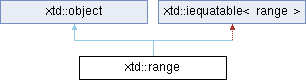
Inheritance diagram for xtd::range:
Definition
Represents a range that has start and end indexes.
Defines a generalized method that a value type or class implements to create a type-specific method f...
Definition iequatable.hpp:23
Supports all classes in the xtd class hierarchy and provides low-level services to derived classes....
Definition object.hpp:40
- Header
- #include <xtd/range>
- Namespace
- xtd
- Library
- xtd.core
- Examples
- The following example demonstrates how to use xtd::range with a xtd::collections::generic::list. The following example demonstrates how to use range literal operator.#include <xtd/xtd>auto main() -> int {auto items = list {1, 2, 3, 4, 5, 6, 7, 8, 9, 10};println("items[range::start_at(index::from_end(8))] = {}", items[range::start_at(index::from_end(8))]);println("items(range::end_at(index::from_start(6))) = {}", items(range::end_at(index::from_start(6))));println("items[range {{3_i, ~2_i}}) = {}", items[range {3_i, ~2_i}]);println("items[{{0, 8}}] = {}", items[{0, 8}]);println("items[{{1_i, ~4_i}}][{{1_i, ~1_i}}] = {}", items[{1_i, ~4_i}][{1_i, ~1_i}]);println("items[{{1_i, ~4_i}}].where(_ % 2 == 0).select(_ * _) = {}", items[{1_i, ~4_i}].where(_ % 2 == 0).select(_ * _));}// This code produces the following output ://// items[range::all()] = [1, 2, 3, 4, 5, 6, 7, 8, 9, 10]// items(range::start_at(2)) = [3, 4, 5, 6, 7, 8, 9, 10]// items[range::start_at(index::from_end(8))] = [3, 4, 5, 6, 7, 8, 9, 10]// items(range::start_at(~8_i)) = [3, 4, 5, 6, 7, 8, 9, 10]// items[range::end_at(6)] = [1, 2, 3, 4, 5, 6]// items(range::end_at(index::from_start(6))) = [1, 2, 3, 4, 5, 6]// items(range::end_at(~4_i)) = [1, 2, 3, 4, 5, 6]// items(range {2, 6}) = [3, 4, 5, 6]// items[range {3_i, ~2_i}) = [4, 5, 6, 7, 8]// items[{0, 8}] = [1, 2, 3, 4, 5, 6, 7, 8]// items[{1_i, ~4_i}][{1_i, ~1_i}] = [3, 4, 5]// items[{1_i, ~4_i}].where(_ % 2 == 0).select(_ * _) = [4, 16, 36]static auto end_at(index_type end) noexcept -> xtd::rangeCreates a xtd::range object starting from the first element in the collection to a specified end inde...Definition range.hpp:142static auto all() noexcept -> xtd::rangeGets a xtd::range object that starts from the first element to the end.Definition range.hpp:133static auto start_at(index_type start) noexcept -> xtd::rangeCreates a new xtd::range object starting from a specified start index to the end of the collection.Definition range.hpp:160constexpr auto selectThe xtd::ranges::views::select instance.Definition select.hpp:40auto println(FILE *file) -> voidWrites the current line terminator to the file output stream using the specified format information.Definition println.hpp:15static constexpr auto from_end(xtd::integer auto value)Creates an xtd::ndex from the end of a collection at a specified index position.Definition index.hpp:181static constexpr auto from_start(xtd::integer auto value)Creates an xtd::ndex from the start of a collection at a specified index position.Definition index.hpp:186The following example shows how to create your own collection with xtd::range operator.#include <xtd/xtd>auto main() -> int {auto items = list {1, 2, 3, 4, 5, 6, 7, 8, 9, 10};}// This code produces the following output ://// items["0..10"_r] = [1, 2, 3, 4, 5, 6, 7, 8, 9, 10]// items["2..6"_r] = [3, 4, 5, 6]// items["0..~0"_r] = [1, 2, 3, 4, 5, 6, 7, 8, 9, 10]// items["2..~4"_r] = [3, 4, 5, 6]// items["~10..~0"_r] = [1, 2, 3, 4, 5, 6, 7, 8, 9, 10]// items["~8..~4"_r] = [3, 4, 5, 6]#include <xtd/xtd>struct persona {string name;int age;};class persona_collection {public:persona_collection() = default;persona_collection(std::initializer_list<persona> items) : items_ {items} {}auto to_string() const noexcept -> string {return string::format("[{}]", string::join(", ", items_));}auto operator [](usize index) -> persona& {return items_[index];}auto operator [](usize index) const -> const persona& {return items_[index];}auto operator [](const xtd::range& range) const -> read_only_span<persona> {return read_only_span<persona> {items_, range};}private:list<persona> items_;};auto main() -> int {auto items = persona_collection {{.name = "Oliver Queen", .age = 24}, {.name = "Laurel Lance", .age = 23}, {.name = "John \"Dig\" Diggle", .age = 27}, {.name = "Thea Queen", .age = 20}, {.name = "Felicity Smoak", .age = 22}};println("items = {}", items);println();println("items[range::all()] = {}", items[range::all()]);println("items[range {{2_i, ~0_i}}] = {}", items[range {2_i, ~0_i}]);println("items[range {{0, 4}}] = {}", items[range {0, 4}]);}// This code produces the following output ://// items = [persona {Oliver Queen, 24}, persona {Laurel Lance, 23}, persona {John "Dig" Diggle, 27}, persona {Thea Queen, 20}, persona {Felicity Smoak, 22}]//// items[range::all()] = [persona {Oliver Queen, 24}, persona {Laurel Lance, 23}, persona {John "Dig" Diggle, 27}, persona {Thea Queen, 20}, persona {Felicity Smoak, 22}]// items[range {2_i, ~0_i}] = [persona {John "Dig" Diggle, 27}, persona {Thea Queen, 20}, persona {Felicity Smoak, 22}]// items[range {0, 4}] = [persona {Oliver Queen, 24}, persona {Laurel Lance, 23}, persona {John "Dig" Diggle, 27}, persona {Thea Queen, 20}]// items["1..3"_r] = [persona {Laurel Lance, 23}, persona {John "Dig" Diggle, 27}]auto to_string() const noexcept -> xtd::string overrideReturns the string representation of the current Range object.Definition range.hpp:125static auto format(const basic_string< char > &fmt, args_t &&... args) -> basic_stringauto range(type_t count)Generates a sequence of integral numbers within a specified range.Definition range.hpp:39auto to_string() const noexcept -> xtd::string overrideReturns the string representation of this xtd::read_only_span <type_t> object.Definition read_only_span.hpp:354
Classes | |
| struct | offset_and_length |
| Represents a offset and length. More... | |
Public Aliases | |
| using | index_type |
| Represents the xtd::range index type. | |
| using | size_type |
| Represents the size type. | |
Public Constructors | |
| range () noexcept=default | |
| Instantiates a new xtd::range instance. | |
| range (const index_type &start, const index_type &end) noexcept | |
| Instantiates a new xtd::range instance with the specified starting and ending indexes. | |
| range (xtd::integer auto start, const xtd::integer auto end) noexcept | |
| Instantiates a new xtd::range instance with the specified starting and ending indexes. | |
Public Properties | |
| constexpr auto | end () const noexcept -> const index_type & |
| Gets an Index that represents the exclusive end index of the range. | |
| constexpr auto | start () const noexcept -> const index_type & |
| Gets the inclusive start index of the Range. | |
Public Methods | |
| auto | equals (const object &obj) const noexcept -> bool override |
| Determines whether the specified object is equal to the current object. | |
| auto | equals (const range &value) const noexcept -> bool override |
| Indicates whether the current object is equal to another object of the same type. | |
| auto | get_offset_and_length (size_type length) const -> offset_and_length |
| Calculates the start offset and length of the range object using a collection length. | |
| auto | get_hash_code () const noexcept -> size_type override |
| Serves as a hash function for a particular type. | |
| auto | to_string () const noexcept -> xtd::string override |
| Returns the string representation of the current Range object. | |
Public Static Properties | |
| static auto | all () noexcept -> xtd::range |
| Gets a xtd::range object that starts from the first element to the end. | |
Public Static Methods | |
| static auto | end_at (index_type end) noexcept -> xtd::range |
| Creates a xtd::range object starting from the first element in the collection to a specified end index. | |
| static auto | end_at (xtd::integer auto end) noexcept -> xtd::range |
| Creates a xtd::range object starting from the first element in the collection to a specified end index. | |
| static auto | parse (const xtd::string &value) -> xtd::range |
| Converts the string to xtd::range equivalent. | |
| static auto | start_at (index_type start) noexcept -> xtd::range |
| Creates a new xtd::range object starting from a specified start index to the end of the collection. | |
| static auto | start_at (xtd::integer auto start) noexcept -> xtd::range |
| Creates a new xtd::range object starting from a specified start index to the end of the collection. | |
| static auto | try_parse (const xtd::string &value, xtd::range &result) noexcept -> bool |
| Converts the string to xtd::range equivalent. A return value indicates whether the conversion succeeded or failed. | |
Additional Inherited Members | |
| object ()=default | |
| Create a new instance of the ultimate base class object. | |
| virtual auto | get_type () const noexcept -> type_object |
| Gets the type of the current instance. | |
| template<typename object_t> | |
| auto | memberwise_clone () const -> xtd::unique_ptr_object< object_t > |
| Creates a shallow copy of the current object. | |
| template<typename object_a_t, typename object_b_t> | |
| static auto | equals (const object_a_t &object_a, const object_b_t &object_b) noexcept -> bool |
| Determines whether the specified object instances are considered equal. | |
| template<typename object_a_t, typename object_b_t> | |
| static auto | reference_equals (const object_a_t &object_a, const object_b_t &object_b) noexcept -> bool |
| Determines whether the specified object instances are the same instance. | |
Member Typedef Documentation
◆ index_type
| using xtd::range::index_type |
Represents the xtd::range index type.
◆ size_type
| using xtd::range::size_type |
Represents the size type.
Constructor & Destructor Documentation
◆ range() [1/3]
|
defaultnoexcept |
Instantiates a new xtd::range instance.
◆ range() [2/3]
|
inlinenoexcept |
Instantiates a new xtd::range instance with the specified starting and ending indexes.
- Parameters
-
start The inclusive start index of the range. end The exclusive end index of the range.
◆ range() [3/3]
|
inlinenoexcept |
Instantiates a new xtd::range instance with the specified starting and ending indexes.
- Parameters
-
start The inclusive start index of the range. end The exclusive end index of the range.
Member Function Documentation
◆ end()
|
inlinenodiscardconstexprnoexcept |
Gets an Index that represents the exclusive end index of the range.
- Returns
- The end index of the range.
◆ start()
|
inlinenodiscardconstexprnoexcept |
Gets the inclusive start index of the Range.
- Returns
- The inclusive start index of the range.
◆ equals() [1/2]
|
inlinenodiscardoverridevirtualnoexcept |
Determines whether the specified object is equal to the current object.
- Parameters
-
obj The object to compare with the current object.
- Returns
- true if the specified object is equal to the current object. otherwise, false.
Reimplemented from xtd::object.
◆ equals() [2/2]
|
inlinenodiscardoverridevirtualnoexcept |
Indicates whether the current object is equal to another object of the same type.
- Parameters
-
obj An object to compare with this object.
- Returns
- true if the current object is equal to the other parameter; otherwise, false.
Implements xtd::iequatable< range >.
◆ get_offset_and_length()
|
inlinenodiscard |
Calculates the start offset and length of the range object using a collection length.
- Parameters
-
lengh A positive integer that represents the length of the collection that the range will be used with.
- Returns
- The start offset and length of the range.
- Examples
- constexpr auto start() const noexcept -> const index_type &Gets the inclusive start index of the Range.Definition range.hpp:90constexpr auto length() const noexcept -> size_typeReturns the length of the current read_only_span.Definition read_only_span.hpp:209
◆ get_hash_code()
|
inlinenodiscardoverridevirtualnoexcept |
Serves as a hash function for a particular type.
- Returns
- A hash code for the current object.
Reimplemented from xtd::object.
◆ to_string()
|
inlinenodiscardoverridevirtualnoexcept |
Returns the string representation of the current Range object.
- Returns
- The string representation of the range.
Reimplemented from xtd::object.
◆ all()
|
inlinestaticnodiscardnoexcept |
Gets a xtd::range object that starts from the first element to the end.
- Returns
- A range from the start to the end.
◆ end_at() [1/2]
|
inlinestaticnodiscardnoexcept |
Creates a xtd::range object starting from the first element in the collection to a specified end index.
- Parameters
-
end The position of the last element up to which the Range object will be created.
- Returns
- A range that starts from the first element to end.
◆ end_at() [2/2]
|
inlinestaticnodiscardnoexcept |
Creates a xtd::range object starting from the first element in the collection to a specified end index.
- Parameters
-
end The position of the last element up to which the Range object will be created.
- Returns
- A range that starts from the first element to end.
◆ parse()
|
inlinestaticnodiscard |
Converts the string to xtd::range equivalent.
- Parameters
-
value A string containing a xtd::index to convert.
- Returns
- A xtd::range equivalent to the native value contained in value.
◆ start_at() [1/2]
|
inlinestaticnodiscardnoexcept |
Creates a new xtd::range object starting from a specified start index to the end of the collection.
- Parameters
-
start The position of the first element from which the Range will be created.
- Returns
- A range from start to the end of the collection.
◆ start_at() [2/2]
|
inlinestaticnodiscardnoexcept |
Creates a new xtd::range object starting from a specified start index to the end of the collection.
- Parameters
-
start The position of the first element from which the Range will be created.
- Returns
- A range from start to the end of the collection.
◆ try_parse()
|
inlinestaticnodiscardnoexcept |
Converts the string to xtd::range equivalent. A return value indicates whether the conversion succeeded or failed.
- Parameters
-
value A string containing a xtd::range to convert. result A xtd::range equivalent to the native value contained in value.
- Returns
- true if s was converted successfully; otherwise, false.
The documentation for this class was generated from the following file:
- xtd.core/include/xtd/range.hpp
Generated on for xtd by Gammasoft. All rights reserved.